

Why secrets management is a critical piece of cloud security (and what this guide will deliver)
Imagine you have many important keys to different parts of your house. If you just leave these keys lying around everywhere, it’s easy for someone to pick them up and get into places they shouldn’t. In the world of cloud computing, "secrets" are like these keys.

They include things like passwords, API keys, and database logins. When these secrets are not handled well, it leads to a big problem called "secret sprawl," where keys are scattered across many systems.
This "secret sprawl" often causes "credential leakage," meaning these important keys can get into the wrong hands. It’s a huge risk for any company using cloud services. When secrets are exposed, it can lead to bad people getting into your systems, stealing data, or messing things up. For aws devops teams, managing these secrets by hand is a heavy burden. It takes a lot of time and effort to keep track of every key, change them regularly, and make sure they are safe, especially in today’s complex cloud agnostic environments. In fact, secure secrets management is a key practice for keeping your systems safe, as explained in the Secrets Management – OWASP Cheat Sheet Series.
This guide is here to help you solve these big problems using AWS Secrets Manager. It’s a special service designed to store and manage your secrets safely. We will show you concrete ways to use aws secrets manager securely. You will learn how to protect your sensitive information, keep your systems safe, and make life easier for your engineering teams. By the end, you’ll have clear steps to manage your secrets not just securely, but also at scale, even when dealing with many different cloud services or securing access through tools like aws api gateway. This will also help you learn how to Fix AWS Issues Faster Cloud Incident Resolution For Engineering Teams when problems arise.
To keep up with all the latest trends in technology and secure practices in 2026, including more insights into AI and cloud advancements, consider subscribing for daily updates.
The AI Newsletter Worth Reading
Leaving secrets scattered around isn’t just a minor mistake; it opens the door to serious problems for any company, especially those using cloud services. These problems can cost a lot of money and damage trust.
Real Risks When Secrets Get Out
Think of your "secrets" as special keys that unlock your most important data and systems. If these keys are not carefully protected, bad actors can easily find them. This can happen in many ways:
- Forgotten in Code: Sometimes, developers accidentally leave passwords or API keys directly in their code or in public places like GitHub.
- Misconfigured Files: Secrets might be put in configuration files that are not secure, allowing unauthorized access.
- Supply Chain Attacks: If a partner company you work with gets hacked, and you shared secrets with them in an unsafe way, your systems can also be at risk. This is a common threat where one weak link can affect many.
When these secrets get out, it can lead to big issues. Bad people can get into your databases, steal customer information, or even shut down your services. For example, a leaked API key for an aws api gateway could give outsiders control over parts of your application.
The Cost of Doing It Yourself
Many companies try to manage secrets on their own, often using spreadsheets or simple files. This "do it yourself" method creates a lot of extra work and hidden costs.

- Manual Rotation is Hard: Passwords and keys should be changed often, but doing this by hand for many systems is time-consuming and prone to mistakes for
aws devopsteams. - No Easy Tracking: It’s tough to know who used which secret and when. This makes it hard to find out what happened if something goes wrong.
- High Risk of Errors: Human errors are more likely when things are done manually. One small mistake can lead to a big security hole.
All this extra effort means your engineering teams spend less time building cool new features and more time on risky, repetitive tasks. This isn’t just about salaries; it’s about lost opportunities and slow progress. When thinking about your cloud operations, it becomes clear that relying solely on manual processes through the basic AWS console isn’t enough anymore. You need more robust tools for modern cloud security and management, which you can learn more about in this guide on Your AWS Console Isn’t Enough Anymore.
How AWS Secrets Manager Helps (and Saves Money)
Using a smart service like aws secrets manager changes the game. It helps your business in a few key ways:
- Less Risk:
AWS Secrets Managerkeeps all your secrets in one very safe place, making them much harder for attackers to find. It acts like a digital vault. - Automatic Rotation: A big benefit is that it can change your passwords and keys for you, automatically. This means less work for your team and better security overall. In fact,
AWS Secrets Manageris designed to help you manage, get, and rotate secrets throughout their lives, including things like database details and API keys, often with an automatic rotation schedule
as noted by AWS documentation on About Systems Manager Parameter Store. This automatic rotation is a main reason to choose it over other options, especially for database credentials that need regular updates, as highlighted in "How to Use Secrets Manager vs Parameter Store." - Easy Monitoring: It keeps a clear record of who accessed what. If there’s an issue, you can quickly find out what happened.
- Works Everywhere: Even if you use different cloud services (a
cloud agnosticsetup),AWS Secrets Managercan still be your central place for keeping secrets safe. - Saves Money: By automating tasks and reducing the chance of costly security breaches,
aws secrets manageractually helps you save money in the long run. It costs a small amount per secret stored and for API calls, but these charges are often much less than the cost of manual work or a security breach, which can include things like legal fees, fines, and losing customer trust. This makes it a smart investment for better security and smoother operations, reflecting its extra features like automatic rotation and connections with other AWS services, as discussed in How to choose the right AWS service for managing secrets and configurations.
Using a smart service like aws secrets manager changes the game. It helps your business in a few key ways:
- Less Risk:
AWS Secrets Managerkeeps all your secrets in one very safe place, making them much harder for attackers to find. It acts like a digital vault. - Automatic Rotation: A big benefit is that it can change your passwords and keys for you, automatically. This means less work for your team and better security overall. In fact,
AWS Secrets Manageris designed to help you manage, get, and rotate secrets throughout their lives, including things like database details and API keys, often with an automatic rotation schedule as noted by AWS documentation on About Systems Manager Parameter Store. This automatic rotation is a main reason to choose it over other options, especially for database credentials that need regular updates, as highlighted in "How to Use Secrets Manager vs Parameter Store." - Easy Monitoring: It keeps a clear record of who accessed what. If there’s an issue, you can quickly find out what happened.
- Works Everywhere: Even if you use different cloud services (a
cloud agnosticsetup),AWS Secrets Managercan still be your central place for keeping secrets safe. - Saves Money: By automating tasks and reducing the chance of costly security breaches,
aws secrets manageractually helps you save money in the long run. It costs a small amount per secret stored and for API calls, but these charges are often much less than the cost of manual work or a security breach, which can include things like legal fees, fines, and losing customer trust. This makes it a smart investment for better security and smoother operations, reflecting its extra features like automatic rotation and connections with other AWS services, as discussed in How to choose the right AWS service for managing secrets and configurations.
Overview: AWS Secrets Manager capabilities and core concepts
AWS Secrets Manager is a service that helps you safely store and manage your secret information, like passwords for databases, API keys for services such as aws api gateway, or other important login details. It handles these "secrets" for you, making them secure and easy to use across your various applications and services. This helps aws devops teams work more smoothly and securely.
Key Features of AWS Secrets Manager
Let’s look at the main things AWS Secrets Manager can do:
- Secure Storage: It acts like a very strong safe for your secrets. All secrets are encrypted, meaning they’re scrambled so only the right people and systems can read them. For most cases, using the
aws/secretsmanagerAWS managed key for encryption is recommended and comes at no extra cost. - Automatic Rotation: One of the best parts is that
AWS Secrets Managercan change your secrets for you on a regular schedule. This automatic rotation means your team doesn’t have to remember to update passwords, making your systems safer without extra effort. It works well with many AWS services, like Amazon RDS databases. This is a key reason to useAWS Secrets Managerover other options. - Cross-Account Access: If your company uses many AWS accounts,
AWS Secrets Managerlets you share secrets safely between them. This is very helpful for big companies or those with complex setups. - Replication: You can copy your secrets to different AWS regions. This is important for keeping your applications running smoothly even if one region has a problem, or if you have users all over the world. Secrets Manager is built for secrets that need to be replicated and shared across accounts, as explained in the AWS Secrets Manager and Parameter Store Decision Guide.
- Integration with AWS KMS:
AWS Secrets Manageruses the AWS Key Management Service (KMS) to encrypt your secrets. This adds another layer of security, as KMS helps you manage the keys that encrypt your data.
Pricing, Limits, and Where it Fits
When you use AWS Secrets Manager, you pay for how many secrets you store and how many times your applications ask for those secrets (API calls). As of 2026, storing a secret typically costs around $0.40 per month, and API calls are about $0.05 for every 10,000 requests. These costs are often much less than what you would pay for a data breach or the time your team spends managing secrets by hand, reflecting its extra features. You can find more details on AWS Secrets Manager pricing.
There are also some limits to keep in mind:
- Secret Size: Each secret can hold up to 65,536 bytes of information, which is enough for most passwords and keys.
- Secrets per Region: You can store up to 100,000 secrets in each AWS region.
- API Request Rates: There are also limits on how many API calls you can make per second, which you can check in the AWS Secrets Manager quotas.
Secrets Manager vs. Parameter Store
It’s important to know that AWS Secrets Manager is different from AWS Systems Manager Parameter Store.
AWS Secrets Manageris best when you need secrets to be automatically rotated, shared across different accounts, or copied to other regions. It’s especially good for database credentials that need regular updates.- Parameter Store is more for general settings and non-secret information, or secrets that don’t need to be rotated often. It has a free tier for standard usage, making it good for simple settings and some encrypted strings.
Choosing the right tool depends on your specific needs for managing secrets and other settings.
Native AWS Integrations and Common Uses
AWS Secrets Manager works well with many other AWS services, making it easy to use in your existing cloud setup:
- IAM (Identity and Access Management): Helps you control who can access your secrets. You can set up specific rules for different users and roles.
- Lambda: You can use AWS Lambda functions to run custom code for secret rotation, extending its capabilities beyond native integrations.
- RDS (Relational Database Service): Automatically rotates database credentials for services like Amazon RDS, Redshift, and DocumentDB, which is a major benefit.
- EKS (Elastic Kubernetes Service): Applications running on Kubernetes clusters can easily get secrets from
AWS Secrets Manager.
Common usage patterns include:
- Storing database login details for applications.
- Keeping API keys safe for third-party services or internal
aws api gatewayendpoints. - Managing credentials for your
aws devopstools. - Handling passwords for servers and other resources.
By understanding these features and how AWS Secrets Manager fits into your cloud strategy, you can boost your security and make your development processes more efficient.
For those eager to stay on top of daily tech and AI advancements, consider subscribing to The AI Newsletter Worth Reading for clear, in-depth updates.
Knowing the differences between AWS Secrets Manager and AWS Systems Manager Parameter Store is very important. But what about other tools? To make it easy to see the main points, here is a simple table comparing AWS Secrets Manager, Parameter Store, and general third-party secret vaults. This helps you pick the right tool for your project’s scale, rules you need to follow (compliance), and if you use more than one cloud service (multi-cloud).
Planned table: feature comparison at-a-glance
| Feature | AWS Secrets Manager | AWS Parameter Store | Third-Party Vaults (General) |
|---|---|---|---|
| Best For | Secrets needing automatic changes (rotation), sharing across accounts or regions, database login details | Settings for apps, non-secret info, simple secrets, projects with a small budget | Projects using many cloud services (multi-cloud), special security rules, or those with existing systems |
| Automatic Rotation | Yes, for many AWS services | No, secrets must be changed by hand | Depends on the tool (some have it, some don’t) |
| Multi-Cloud Support | Mainly for AWS, limited for other clouds | Mainly for AWS, limited for other clouds | Yes, often built to work with many clouds (cloud agnostic) |
| Cost | You pay for each secret and for how many times you ask for them | Free for basic use, costs more for advanced features | Varies a lot, often has higher costs for big companies |
| Compliance | Meets many strict security rules because it’s an AWS service | Meets many strict security rules because it’s an AWS service | Varies by the company providing the tool, can be very strong |
When choosing a secret management tool, think about these things:
- For AWS-only work with important secrets:
AWS Secrets Manageris often the best choice, especially if your secrets need to change automatically, like database passwords, as discussed in How to Use Secrets Manager vs Parameter Store. It’s great foraws devopsteams who want to keep things safe and simple within the AWS ecosystem. - For simple settings or less sensitive secrets on AWS: AWS Systems Manager Parameter Store is a good, often free, option for storing settings or less critical secrets that don’t need frequent changes.
- For using many clouds (cloud agnostic): If your company uses AWS, Azure, Google Cloud, or even your own data centers, a third-party vault might be better. These tools are built to work across different environments, giving you one central place for all your secrets. They help keep your
aws api gatewaykeys and other important login details safe, no matter where they are used.
Choosing the right tool helps you manage your secrets more easily, keeps your applications secure, and supports your overall strategy for using cloud services. To improve your cloud operations, consider learning more about optimizing AWS storage for peak performance and cost savings.
Choosing the right tool is just the first step. After you decide on AWS Secrets Manager for your important secrets, the next big task is making sure those secrets are kept fresh and safe over time. This means setting up good rules for how often secrets change (we call this rotation) and how they are handled throughout their life.
Designing secure secret rotation and lifecycle policies
Secrets, like passwords or API keys, should not stay the same forever. If a secret never changes, and it gets stolen, then the thief can use it for a very long time. Changing secrets regularly makes it harder for bad actors to use old, stolen information. This is why secret rotation is a key part of keeping things secure.
Best ways to rotate secrets and what can go wrong
How often should you rotate a secret? There’s no single perfect answer, but many experts suggest changing them often, such as every 30, 60, 90 days, or at least once a year. It depends on how important the secret is. Think about how often your company’s rules or security guidelines say to change important passwords. These "routine" changes keep your systems safer.
AWS Secrets Manager is great because it can handle this rotation for you automatically for many AWS services. It works with services like Amazon RDS, Amazon Redshift, and Amazon DocumentDB. When AWS Secrets Manager rotates a secret, it changes the secret value in the database or service and updates the secret stored within Secrets Manager. This helps aws devops teams keep their systems secure without needing to do manual updates that can sometimes be missed or cause errors.
Actually, AWS Secrets Manager uses another AWS service called AWS Key Management Service (KMS) to encrypt your secrets. When a secret changes, Secrets Manager asks KMS for a new way to encrypt that secret value, using something called "envelope encryption" which keeps your data very safe AWS KMS Explained: Features, Functionality, and Best Practices. It’s important to know that rotating a secret in AWS Secrets Manager is different from rotating the KMS encryption key itself Question on KMS, and Secret Manager auto rotation. AWS KMS can also automatically rotate its encryption keys, usually once a year, for certain types of keys Rotate AWS KMS keys. This adds another layer of security, making sure the keys that protect your secrets are also regularly updated.
A common problem, or "pitfall," with secret rotation is when you forget to update all the places that use a secret. If a secret changes but one of your applications is still trying to use the old secret, that application will break. Imagine an aws api gateway trying to connect to a backend service with an outdated key. That’s why planning is key.
Smart ways to handle secret versions and make changes safely
To avoid breaking things, you can use "versioning" and "staging" with AWS Secrets Manager. Every time a secret changes, AWS Secrets Manager saves it as a new version. This is like having many saved copies of a document. If a new secret causes problems, you can quickly "roll back" to an older, working version. This means you can go back to the way things were before the change, making sure your applications keep running smoothly.
You can also use "staging labels" to mark different versions of a secret, like "AWSCURRENT" for the secret in use right now, and "AWSPENDING" for the new secret that’s about to be used. This allows for a safe process:
- A new secret is created.
- It’s tested to make sure it works.
- Once confirmed, it becomes the "current" secret.
This careful process helps prevent issues and keeps your services working.
Clear instructions for teams (runbooks)
Even with automatic tools, your team needs clear steps to follow. These are often written down in "operational runbooks." A runbook for secret rotation should include:
- How to test rotation: Steps to make sure that when a secret rotates, everything still works.
- What to watch: Important numbers or alerts (metrics) to monitor after a rotation. This helps you spot problems early.
- Goals for secret freshness: Clear aims for how quickly secrets should be rotated or updated. For example, your goal might be that no secret is older than 90 days.
- What to do if a secret leaks: A plan for what your team should do if a secret is accidentally exposed. This includes removing the old secret and replacing it with a new one Secrets Management – OWASP Cheat Sheet Series. Having a plan helps you fix AWS issues faster and protect your systems right away.
By planning carefully and using the features of AWS Secrets Manager, you can make sure your secrets are rotated safely and your applications stay secure. This proactive approach is a big win for any engineering team.
If you want to keep up with the latest in tech and ensure your engineering practices are top-notch, consider getting daily insights.
The AI Newsletter Worth Reading
Secure secret management doesn’t stop with rotation. It also needs to be a core part of how your applications are built and run. This means carefully putting secrets into your development and deployment workflows, often called Continuous Integration/Continuous Deployment (CI/CD) and DevOps pipelines. The goal is to get your secrets where they need to be without showing them to unauthorized people or accidentally saving them in logs.
Integrating Secrets Manager into CI/CD and DevOps pipelines
In 2026, building software means using automated pipelines. These pipelines move your code from development to testing to live use. If your secrets are not handled correctly in these pipelines, they can become a big risk. AWS Secrets Manager helps you safely inject secrets into your builds, runtime containers, and serverless functions, keeping them hidden from logs and preventing leaks. This is a crucial part of modern aws devops practices.
Injecting secrets safely into your pipelines
When you build applications, you need secrets for many things, like connecting to databases or third-party services. The main challenge is to get these secrets into your applications without embedding them directly in code or leaving them exposed in logs during the build process.
Here are some smart ways to inject secrets:
- Runtime retrieval: Instead of putting secrets into your application during the build, have your application fetch them from
AWS Secrets Managerwhen it starts up or needs them. This means the secret is never saved in the build artifact itself. - Environment variables (masked): For some pipeline steps, you might need to pass secrets as environment variables.
AWS Secrets Managercan fetch a secret, and your CI/CD tool can then set it as an environment variable, often "masking" it so it doesn’t show up in logs. This is especially useful for tools likeaws api gatewaythat need keys to talk to other services. - Mounted files for containers: In containerized environments like Kubernetes, secrets can be mounted as files inside the container. This way, the application reads the secret from a file path rather than an environment variable, which can sometimes be more secure as environment variables can be accidentally exposed.
Tooling integrations for seamless secret management
Many popular development tools work well with AWS Secrets Manager.
Terraform
Terraform, a tool for managing infrastructure as code, can create and manage secrets within AWS Secrets Manager. You can use Terraform to define your secrets and their settings, making sure they are part of your infrastructure setup. For example, you can tell Terraform to make a new secret in AWS Secrets Manager when setting up a database. If you’re using Terraform with GitHub Actions, you can also fetch these secrets during your deployment steps to provision infrastructure securely. To learn more about setting up these kinds of workflows, you can explore resources like GitHub for adding AWS Secrets Manager with Terraform.
GitHub Actions
For teams using GitHub for their code, GitHub Actions can directly fetch secrets from AWS Secrets Manager. You can use a special GitHub Action that talks to AWS Secrets Manager and makes the secrets available as masked environment variables in your workflow. This keeps sensitive information out of your build logs. A common way is to use an action like the AWS Secrets Manager GitHub Action which helps retrieve secrets and make them available to your jobs. Another method involves using the AWS CLI within your GitHub workflow to retrieve secrets, as shown in guides like How to Handle Secrets in CI/CD Pipelines.
Jenkins
Jenkins, another popular CI/CD tool, can also integrate with AWS Secrets Manager. You would typically use a Jenkins plugin or custom script to connect to AWS, retrieve secrets, and then inject them as environment variables into your Jenkins jobs. This allows your build and deployment processes to access necessary credentials safely.
Kubernetes (CSI driver)
When running applications in Kubernetes clusters, like Amazon EKS, you can use the Secrets Store Container Storage Interface (CSI) Driver. This driver lets your Kubernetes pods access secrets stored in AWS Secrets Manager by mounting them as files directly into the pod’s file system. This way, secrets are never stored as native Kubernetes secrets, which might have different security levels. You can also use tools like the External Secrets Operator with Kubernetes to manage syncing secrets from AWS Secrets Manager into your cluster. The Secrets Store CSI Driver for External Secrets is a widely used method for this, offering a secure way to handle secrets in a cloud agnostic approach. This helps keep secrets out of your regular Kubernetes configurations.
Operational controls and least-privilege access
A key security idea for AWS Secrets Manager and your CI/CD pipelines is "least-privilege access." This means giving your build tools, services, and users only the exact permissions they need to do their job, and nothing more.
- IAM Roles: Instead of using fixed access keys, your AWS resources (like EC2 instances, Lambda functions, or GitHub Actions configured for AWS) should use IAM Roles. These roles grant temporary permissions, which are much safer.
- Fine-grained permissions: Make sure the IAM policies attached to these roles only allow access to specific secrets that are truly needed for that part of the pipeline. For example, a build pipeline for an application might only need to read a database secret, not change it.
- Monitoring and Auditing: Always keep an eye on who is accessing secrets and when.
AWS CloudTrailrecords all API calls made toAWS Secrets Manager, giving you a clear audit trail of secret access.
By integrating AWS Secrets Manager effectively into your CI/CD and DevOps pipelines, you create a robust system where secrets are managed, rotated, and accessed securely. This proactive step helps your aws devops teams build and deploy applications with confidence. Knowing how to choose the right strategic choices for developer tools and cloud platforms in 2026 is also key to overall system security and efficiency.
An important part of understanding secure secret management is seeing how it all works together. Imagine a picture or diagram of your software pipeline. This picture would show how your code moves from being written to being put into action. It also shows how AWS Secrets Manager fits into every step of this journey, making sure secrets are safe.
This kind of diagram highlights how different parts of your system talk to AWS Secrets Manager:
- For build agents and runners: When your code is being built or tested, tools like GitHub Actions or Jenkins runners need secrets. The diagram would show these tools connecting to
AWS Secrets Manager. They use special temporary passes, called IAM Roles, to ask for the secrets they need. This way, the secrets are never saved inside the build tools themselves or in logs where they could be seen. For more on keeping secrets safe in these pipelines, consider reading about Secrets Management Policy in CI/CD pipelines. - For deployed applications: Once your application is running, maybe on an Amazon EC2 server or in a Kubernetes cluster, it also needs secrets. The diagram would show these applications reaching out directly to
AWS Secrets Managerwhen they start up or when they need to connect to a database oraws api gateway. This method ensures secrets are retrieved just-in-time and are never sitting around in configuration files.
Keeping things super secure with strong controls
The visual would also bring to life the strong security controls that protect your secrets:
- IAM Roles for temporary access: Each part of your pipeline, whether it’s a build tool or a running application, gets its own special
IAM Role. Think of these as temporary, limited-access badges. These badges only let them get the exact secrets they need, and nothing more, for a short time. This is a core idea inaws devopscalled "least-privilege access." - Secrets that disappear: Secrets are not kept forever in your tools or applications. Instead, they are ephemeral which means they are pulled from
AWS Secrets Managerwhen needed and then quickly forgotten. This greatly reduces the chance of someone finding a secret that was left lying around. - Strong network walls:
AWS Secrets Manageracts like a secure vault with strong network walls around it. This means only authorized services and applications within your AWS environment can even try to access it. This setup creates secure network boundaries, keeping your sensitive information tucked away safely.
Using AWS Secrets Manager in this way helps your team develop and deploy software with a clear mind, knowing that sensitive information is protected throughout your entire cloud agnostic setup.
Staying informed on the latest trends in software engineering and cloud technologies is key to maintaining such robust systems. To keep up with the fast-moving world of AI and technology, consider getting The AI Newsletter Worth Reading for clear daily updates.
Building on the idea of strong security, let’s look closer at how AWS Secrets Manager handles who can see your secrets, how it keeps them safe, and how you can check what’s happening. It all comes down to controlling access, using strong encryption, and keeping good records.
Access control, encryption, and auditing best practices
Keeping your secrets safe needs clear rules about who can get to them and what they can do. This is known as access control.
Making sure only the right people and programs have access
The main idea here is "least privilege." This means giving each person or program only the exact permissions they need to do their job, and nothing more. AWS Secrets Manager works hand-in-hand with AWS Identity and Access Management (IAM) to make this happen.
- IAM Policies and Roles: You set up special rules called IAM policies. These policies say who can do what with which secrets. Then, you give these policies to IAM roles. Imagine an IAM role as a special ID card that a computer program or a person can temporarily use. When your applications, like those in
aws devopssetups, need a secret, they temporarily "assume" an IAM role. This role only lets them fetch the specific secrets they are allowed to see. This way, no program has too much power, and it reduces the risk if one part of your system ever gets into trouble. You can even set up these roles to allow secure access across different AWS accounts, keeping your setup flexible but still safe.
Keeping secrets locked up with strong encryption
Encryption means scrambling your information so only someone with the right key can read it. AWS Secrets Manager makes sure your secrets are always encrypted when they are stored. It does this by using another important AWS service called AWS Key Management Service (KMS).
- Envelope Encryption with AWS KMS: When you store a secret in
AWS Secrets Manager, it doesn’t just encrypt it with one key. Instead, it uses a smart method called "envelope encryption." Think of it like this: your actual secret is put inside a small, encrypted box (encrypted with a "data key"). Then, that small encrypted box is put inside a bigger, also encrypted envelope (encrypted with a KMS key).AWS Secrets ManagerasksAWS KMSto create these keys and handle the encryption. This means the really important "master" keys fromAWS KMSnever directly touch your secrets. For more details on this process, you can read about AWS KMS Explained: Features, Functionality, and Best Practices. - Key Rotation for extra safety: To make things even safer, it’s a good idea to change your encryption keys from time to time. This is called key rotation.
AWS KMScan automatically rotate the keys it creates for you every year, giving you fresh security without you having to do anything manually for most keys. This process replaces the old key material with new, fresh material, while making sure any data encrypted with older key versions can still be opened when needed. You can learn more about Rotate AWS KMS keys.
Checking who did what: Auditing and compliance
Being able to look back and see who accessed which secret, and when, is very important. This helps you meet security rules and quickly find any unusual activity.
- CloudTrail Events: AWS CloudTrail is like a security camera for your AWS account. It records almost every action taken in your AWS environment, including when someone tries to access, create, or change a secret in
AWS Secrets Manager. These records, called CloudTrail events, are super important. - Alerts and Tamper-Evident Logs: You can set up alerts that notify you right away if something suspicious happens, like someone trying to get a secret they shouldn’t. By keeping these CloudTrail logs safe and unchanged, you create a "tamper-evident" record. This means if anyone tries to change the logs, you’d know. This helps your team prove that you’re following important security rules and regulations.
By combining strict access control, strong encryption, and detailed auditing, AWS Secrets Manager gives you a powerful way to protect your sensitive information. For engineering teams, keeping track of all cloud activity is key. You might find it helpful to look into how to monitor and respond to cloud incidents for a stronger security posture.
Now, let’s look at a quick list of things your team can check. This will help make sure your AWS Secrets Manager setup is always safe. Think of it as a helpful security checkup.
Quick checklist: IAM, KMS, and logging settings to verify
Keeping your secrets safe means regularly checking your settings. Here’s a simple list to help you make sure everything is in order.
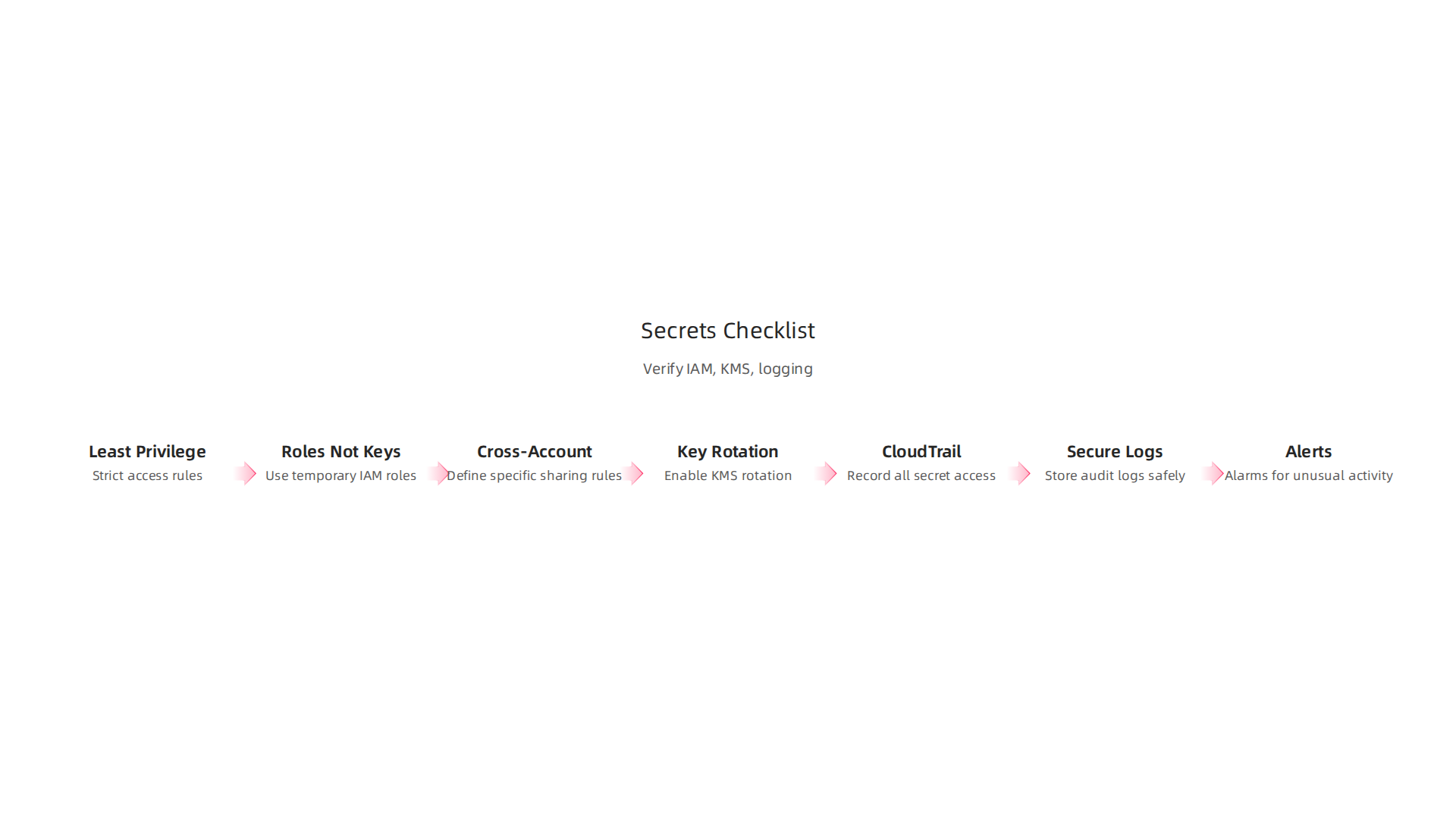
For IAM (Who can access what):
- Least Privilege: Are the rules for who can get secrets very strict? Make sure no one or no program has more access than they truly need. Avoid giving wide permissions like "do anything" or "access all secrets."
- Roles, Not Keys: Are your applications using temporary IAM roles to get secrets instead of long-lasting access keys? This is a much safer way.
- Cross-Account Access: If you share secrets between different AWS accounts, are these sharing rules very specific? You want to make sure only the right accounts and programs can see them.
For KMS (How secrets are encrypted):
- Key Rotation: Is
AWS KMSset to automatically change the encryption keys that protect your secrets every year? This is an important security step, especially for symmetric keys thatAWS KMScreates for you. You can check the Key rotation for AWS KMS and scope of impact for more details. - Customer-Managed Keys: If you use your own special KMS keys, are you sure they are managed well? Are they protected from being shared too broadly?
For Logging (Keeping records):
- CloudTrail Active: Is AWS CloudTrail always turned on and writing down every time someone tries to access, create, or change a secret in
AWS Secrets Manager? - Secure Logs: Are these CloudTrail records stored in a safe place, like an S3 storage area, where no one can easily change them? This helps prove what happened.
- Alerts for Trouble: Do you have alarms set up that will tell you right away if someone tries to get a secret they shouldn’t, or if something unusual happens?
By going through this list often, you can help protect your sensitive information and avoid common mistakes that might make your secrets less secure. Thinking about security from all angles, from how you manage secrets to which developer tools you choose, is important for any team. You can learn more about making smart choices for your cloud setup in Strategic Choices for Developer Tools and Cloud Platforms in 2026.
Keeping up with technology changes is key. Stay informed with daily insights from experts.
Get clear daily AI updates from The AI Newsletter Worth Reading.
Managing secrets well with AWS Secrets Manager is super important, but it’s also easy to make mistakes. Let’s talk about common slip-ups, how to follow the rules, and what to do if a secret gets out.
Common pitfalls, compliance considerations, and incident response for secrets
Even with the best tools like AWS Secrets Manager, mistakes can happen. Knowing what to watch out for helps a lot.
Watch out for these common mistakes:
- Secrets in your code: This is a big one. Sometimes, secrets like passwords or API keys accidentally end up directly in your code files. If these files get shared or put online, anyone can see your secrets. This is a major security risk. To fix this, always use
AWS Secrets Managerfrom the start. Teach your team to fetch secrets from the manager, not hardcode them. - Not changing secrets often enough: Old secrets are like old locks; they can be easier to break. If you don’t update them, they become a bigger target.
AWS Secrets Managercan automatically change secrets for you. Make sure this automatic rotation is turned on for all your important secrets. You can learn more about monitoring your secrets to catch problems quickly in Monitoring AWS Secrets Manager secrets. - Giving too much access: This is like giving everyone a master key when they only need to open one door. If your IAM (Identity and Access Management) rules allow too many people or programs to access secrets they don’t need, it raises the risk. Always give the least amount of access necessary. Go back and check your IAM policies to make sure they are strict.
Keeping up with rules and laws (Compliance):
Many jobs and companies have rules they need to follow, like how to handle sensitive data. AWS Secrets Manager helps you meet these rules.
- Where data lives: Some rules say your data must stay in certain countries or regions.
AWS Secrets Managerlets you pick which AWS region your secrets are stored in, helping you meet these "data residency" rules. - Record keeping: It’s important to keep a record of who accessed what and when.
AWS CloudTrailworks withAWS Secrets Managerto log every action taken on your secrets. This creates an "audit trail" that proves you’re following the rules. You can see how AWS records these actions in Log AWS Secrets Manager events with AWS CloudTrail. - Proof for audits: If someone checks your security (an audit), these logs from CloudTrail are your proof. They show how you protected your secrets and how you responded if something went wrong.
AWS Secrets Manageralso helps with specific standards, like being compliant with Compliance validation for AWS Secrets Manager for payment card industry data.
What to do when a secret gets out (Incident Response):
No matter how careful you are, a secret might sometimes leak. Having a plan is key.
- Find out fast: The first step is to know right away when a secret has been exposed. Use alarms and monitoring tools like CloudWatch to get alerts if something unusual happens, like too many people trying to get a secret.
- Change the secret: As soon as you know a secret is out, you must change it immediately. This is called "rotating" the secret.
AWS Secrets Managerhelps you do this quickly, either automatically or manually. The faster you change it, the less harm can be done. This quick action is a core part of Secrets Management best practices. - See how bad it is: Figure out what could have been accessed with the leaked secret. This helps you understand the damage and decide what other steps you need to take. This step is called "scope analysis" and is a vital part of a Secrets incident response playbook for engineering teams.
- Learn from it: After everything is fixed, look back at what happened. How did the secret get out? How can you prevent it next time?

This "post-incident review" makes your security stronger for the future. You can also explore how to improve your team’s response to such issues with information on Fix AWS issues faster: cloud incident resolution for engineering teams.
By following these steps, your team can use AWS Secrets Manager more safely, keep important information protected, and be ready for any problems that might come up.
Summary
This article explains why secrets management is a cornerstone of cloud security and shows how AWS Secrets Manager solves common problems like secret sprawl and credential leakage. It describes the main capabilities—secure encrypted storage, automatic rotation, cross-account sharing, replication, and KMS integration—plus pricing and service limits so you can weigh cost versus risk. The guide covers practical design: rotation policies, versioning and staging, runbooks for safe rollouts, and CI/CD patterns that avoid embedding secrets in code or logs. You’ll also get recommended IAM least-privilege practices, encryption and audit controls (CloudTrail), monitoring checks, and a simple verification checklist. Finally, the article walks through common mistakes, compliance considerations, and the immediate steps to take if a secret is exposed, giving engineering teams clear actions to protect secrets at scale.


