

Imagine your website or app suddenly slows down, or worse, completely stops working. Often, the hidden cause isn’t your own code, but a problem with the underlying internet services you use. For many businesses in 2026, that means issues within Amazon Web Services (AWS). Understanding your aws status isn’t just a good idea; it’s vital for keeping your database-driven systems running smoothly.
A small hiccup in an AWS region can quickly turn into a major database outage, making your applications unusable. This can also lead to hidden performance problems that make your customers unhappy without you even knowing why. Services like aws aurora, a popular database choice, are built to be highly available, but they still rely on other AWS services working perfectly. Even if you’re using a cloud native pg setup, the health of the underlying AWS infrastructure directly impacts its performance and reliability.
So, how do you keep track of all this? AWS provides tools like the AWS Health Dashboard and the AWS Personal Health Dashboard. These tools give you a personalized look at how AWS services are performing for your account. Relying solely on your own monitoring isn’t enough anymore for effective cloud operations in 2026.
This guide will show you how AWS reports its aws status, how different incidents can affect common database services like AWS Aurora, and what practical steps your engineering team can take. We’ll cover ways to respond and recover, helping you prevent costly downtime and maintain peak performance. Staying on top of technology trends, including cloud infrastructure health, is key for any software engineer. If you want to keep learning about the cutting edge of tech, especially AI, there’s a great resource you should know about. Get clear daily AI updates from The Deep View Newsletter.
Understanding how AWS tells us about its health is super important. It’s not just one big status report. Instead, AWS breaks down its aws status by different parts: pages, regions, and service types.
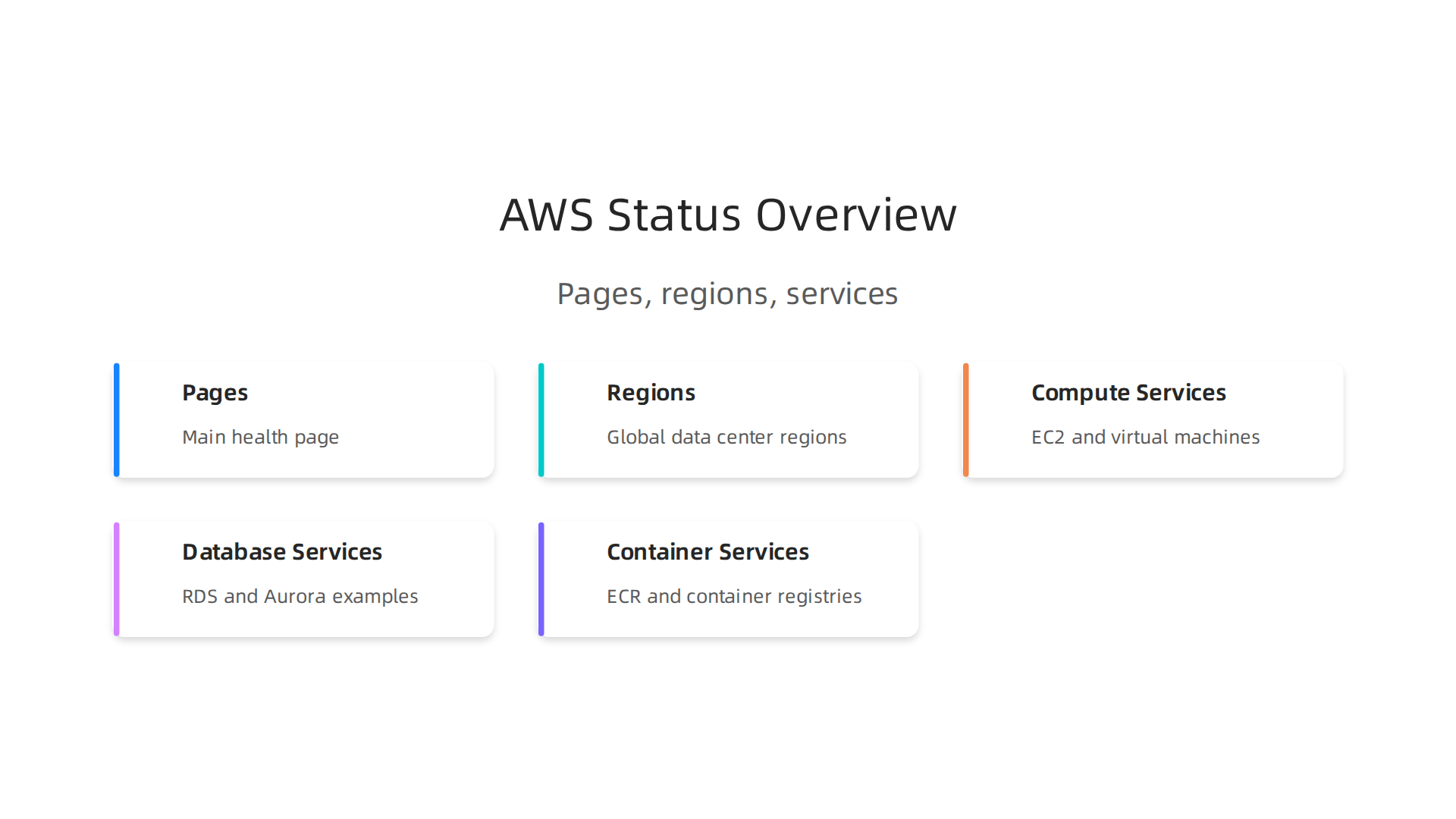
First, there’s the main Status of AWS cloud resources – AWS Health page, which everyone can see. This page shows you the general health of all AWS services around the world. It’s like a big traffic light for all of AWS. When you look at this page, you’ll see green checks for services working fine and other colors if there are problems.
But AWS is huge, so they also divide everything into "regions." Think of regions as different big computer centers in various parts of the world, like a center in Ohio or one in Ireland. An issue might only affect services in one region, not all of them. Inside each region, there are many different services, such as:
- Compute Services: Like EC2, which are virtual computers.
- Database Services: Such as
aws aurora, a popular database, or the basic RDS. - Container Services: Like
aws ecrfor storing your software containers.
So, when something goes wrong, the aws status report will tell you exactly which service in which region is having trouble. This detailed view helps you understand if your specific setup, maybe running a cloud native pg database, is impacted.
AWS also offers ways for your own computer programs to check their status using something called an API. This means your systems can automatically ask AWS for health updates instead of a person having to look at a webpage. The AWS Health API lets you get event information for your resources.
There’s a difference between a small blip and a big problem. Sometimes, a service might just have a short "anomaly," meaning it’s working a bit slowly for a short time. Other times, it’s a larger "outage" where a service stops working completely, or even many services in a whole region go down. AWS reports these events with different levels of detail, helping you understand how serious the issue is and if it affects your specific services or data.
Staying skilled in managing these cloud platforms is key for any software engineer today. To deepen your expertise and keep up with the fast-changing world of tech, especially if you’re thinking about official recognition, you might want to consider some training. Online Certifications for Software Engineering Keep You Ahead in 2026.
Understanding how AWS tells us about its health is super important. It’s not just one big status report. Instead, AWS breaks down its aws status by different parts: pages, regions, and service types.
First, there’s the main Status of AWS cloud resources – AWS Health page, which everyone can see. This page shows you the general health of all AWS services around the world. It’s like a big traffic light for all of AWS. When you look at this page, you’ll see green checks for services working fine and other colors if there are problems.
But AWS is huge, so they also divide everything into "regions." Think of regions as different big computer centers in various parts of the world, like a center in Ohio or one in Ireland. An issue might only affect services in one region, not all of them. Inside each region, there are many different services, such as:
- Compute Services: Like EC2, which are virtual computers.
- Database Services: Such as
aws aurora, a popular database, or the basic RDS. - Container Services: Like
aws ecrfor storing your software containers.
So, when something goes wrong, the aws status report will tell you exactly which service in which region is having trouble. This detailed view helps you understand if your specific setup, maybe running a cloud native pg database, is impacted.
AWS also offers ways for your own computer programs to check their status using something called an API. This means your systems can automatically ask AWS for health updates instead of a person having to look at a webpage. The AWS Health API lets you get event information for your resources.
There’s a difference between a small blip and a big problem. Sometimes, a service might just have a short "anomaly," meaning it’s working a bit slowly for a short time. Other times, it’s a larger "outage" where a service stops working completely, or even many services in a whole region go down. AWS reports these events with different levels of detail, helping you understand how serious the issue is and if it affects your specific services or data.
Staying skilled in managing these cloud platforms is key for any software engineer today. To deepen your expertise and keep up with the fast-changing world of tech, especially if you’re thinking about official recognition, you might want to consider some training. Online Certifications for Software Engineering Keep You Ahead in 2026.
Real-time Monitoring vs. Historical Incidents: What to Track
When you run important applications on AWS, you need to know what’s happening right now and also learn from what happened before. This means looking at aws status in two ways: real-time monitoring and historical incidents.
Real-time monitoring is like watching a live sports game. You want to see every play as it happens.

For AWS, this means checking things like:
- AWS CloudWatch: This is an AWS tool that collects data and sets off alarms. It can tell you if your virtual computers (EC2) are running too hot or if your databases like
aws auroraare too busy. You can set up alerts to get a message the moment something goes wrong. - Third-party monitors: There are other companies that make tools to watch your AWS services. They might offer different ways to see your data or send alerts. These tools often help you get an "early warning" so you can fix small issues before they become big problems.
These tools give you a direct, up-to-the-minute view of your services, whether it’s an aws ecr container acting up or a cloud native pg database slowing down. You might also find general information about various AWS services, which helps understand the bigger picture when something goes wrong all.csv – GitHub.
Now, historical incidents are like reviewing the game film after it’s over. You look back at what went wrong in the past. This helps you understand patterns and prevent future problems. For example, if your service often slows down every Tuesday morning, looking at past incident data can help you find out why. This "post-hoc context" means you learn from history.
Combining real-time alerts with historical data is super helpful. If you get an alert that a service is slow, you can quickly check if this has happened before and what caused it. This helps you figure out if it’s a false alarm or a real issue that needs urgent attention. It also makes it easier to "triage," which means figuring out what’s most important to fix first. Sometimes, just looking at the basic AWS console isn’t enough for these kinds of detailed insights your AWS console isn’t enough anymore here’s what you need for cloud operations in 2026.
Staying on top of all these moving parts in tech is a big job. To keep learning and improving, consider checking out The AI Newsletter Worth Reading for clear daily AI updates.
It’s clear that knowing about aws status helps you understand what’s happening now and what went wrong before. But what happens when an AWS problem affects your important databases? Let’s look at how different kinds of AWS issues can impact services like RDS, DynamoDB, aws aurora, and DocumentDB.
When something goes wrong in AWS, it can be a "control plane" issue or a "data plane" issue. Think of it this way:
- Control Plane: This is like the front office of a company. It’s where you ask for new services, change settings, or shut things down. If the control plane has issues, you might not be able to create a new database or change its size. Your existing databases, though, might keep running fine for a while because their actual work happens in the data plane.
- Data Plane: This is like the factory floor where all the actual work gets done. If the data plane has issues, your database might stop working, slow down, or you might not be able to save or get your data. This is much more serious for things like an
aws auroradatabase or acloud native pgsetup.
Networking problems are another common issue. If the network between your application and your database breaks or slows down, your application can’t talk to the database. It’s like having a phone call with bad reception. Your database might be perfectly healthy, but your application can’t reach it, leading to errors or slow performance.
Sometimes, an entire AWS "region" can have big problems. As we talked about, regions are like separate big computer centers. If a whole region goes down, all the databases in that region, whether it’s RDS, DynamoDB, aws aurora, or DocumentDB, will be affected. This is why many smart teams set up their important databases to run in more than one region, just in case.
Each AWS database has its own way of handling these issues:
- RDS (Relational Database Service): For databases like MySQL or PostgreSQL, RDS often has features like "Multi-AZ" deployments. This means a copy of your database lives in a different location. If the main one fails, AWS can switch to the copy very quickly, often with just a few minutes of downtime.
- DynamoDB: This is a "NoSQL" database that is built to be super resilient. It spreads your data across many servers and locations automatically. So, if one part has a problem, others can often pick up the slack without you noticing.
- AWS Aurora: This is a special database built by AWS. It’s designed for very fast recovery and high availability, meaning it tries hard to stay online even when things go wrong. Like RDS, it can use multiple locations to keep your data safe and available.
- DocumentDB: This database is for document-style data, much like MongoDB. It also uses multiple copies of your data to help it stay available during problems.
Understanding how these different databases react to AWS incidents is important for keeping your applications running smoothly. Choosing the right database for your needs is a big decision Survey of Existing Engineering Database Management Systems. Learning how to manage and protect these systems, including things like aws ecr for your application containers, is a key skill for today’s software engineers. If you’re serious about your career in the cloud, understanding these details can really help. Learning about how to pass your AWS DevOps Certification Still Matters in 2026: Here is How to Pass.
The last section explained how different AWS databases handle problems. Now, let’s talk about how to build your database systems on AWS so they can handle issues even better.

It’s not just about checking aws status when something goes wrong; it’s about being ready ahead of time. This is called designing for resilience.
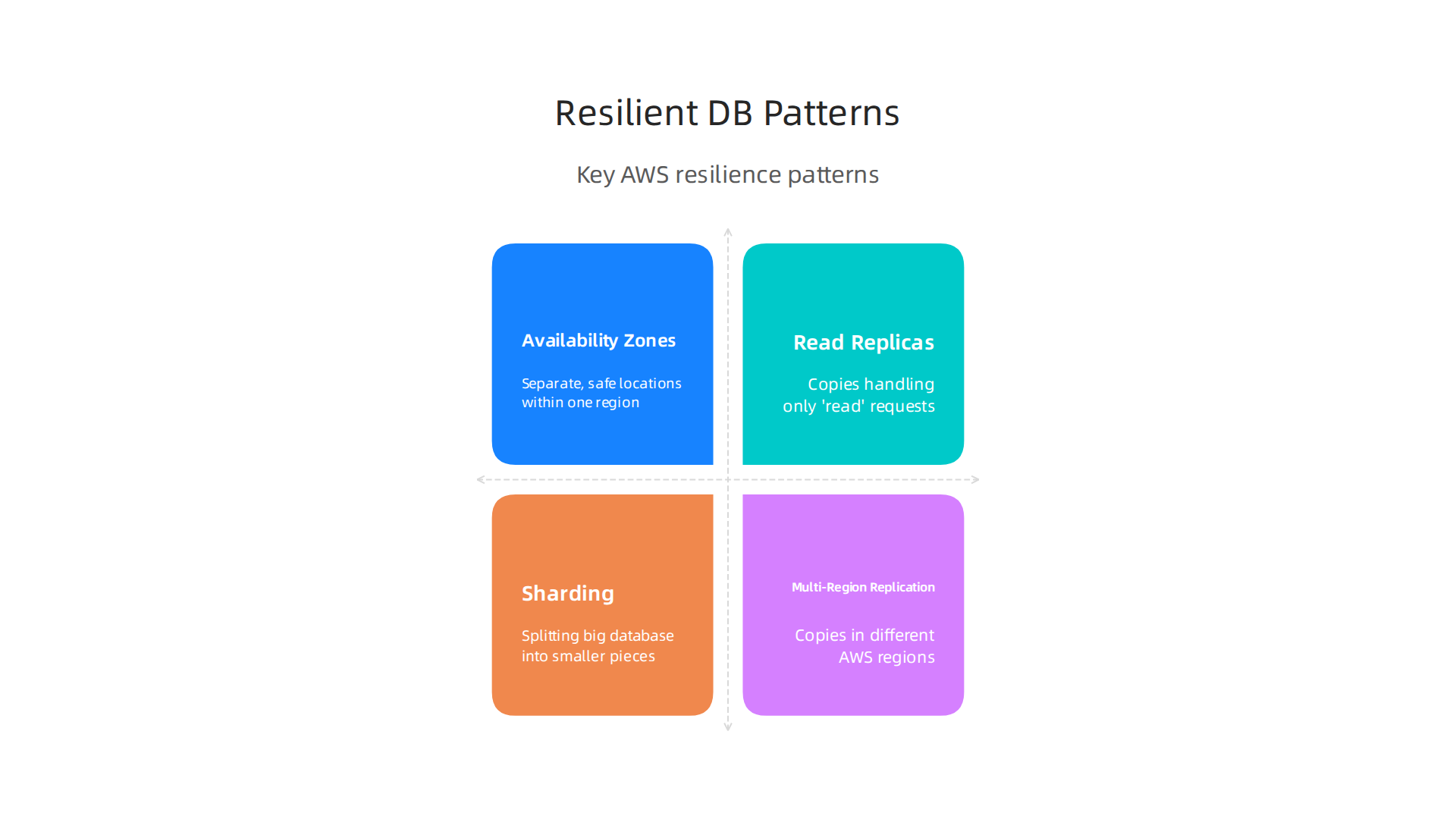
One key way to do this is by using Availability Zones (AZs). These are separate, safe locations within one AWS region. When you set up a database like RDS or aws aurora in a "Multi-AZ" way, AWS makes a copy of your database in another AZ. If one AZ has a problem, AWS can quickly switch to the copy in the other AZ. This helps your applications stay online.
Another helpful pattern is Read Replicas. Imagine you have a busy website. Many people are reading information from your database, but only a few are adding new information. Read replicas are copies of your main database that handle only the "read" requests. This takes the pressure off your main database and can speed things up. If your main database is slowed by an issue, read replicas can still serve data.
For very large databases, you might use sharding. This means splitting your big database into smaller, more manageable pieces, or "shards," each running on its own server. If one shard has an issue, only a small part of your data is affected, not everything. This also helps with scaling as your data grows.
The most powerful way to make your database super strong against failures is Multi-Region Replication. This means having copies of your database in completely different AWS regions. If an entire AWS region has a major outage, your applications can switch over to the database in another region. This provides global availability and protection against big disasters How to Build Multi-Region Architecture.
This strategy is vital for mission-critical applications today, especially for large-scale data systems. For example, setting up a cloud native pg database with multi-region replication means your PostgreSQL data is safe across continents. Understanding how to manage data across multiple AWS regions is complex but essential for resilience Data Management Patterns for Multi-Region Deployments on AWS.
While building these strong systems, you must think about some trade-offs:
- Latency: Having data spread across many places can sometimes make it slower to access, especially if you need to fetch data from far away.
- Consistency: Keeping all copies of your data perfectly in sync can be hard. Sometimes, you might choose "eventual consistency," where data eventually matches up, but not instantly.
- Cost: Running more copies of your databases in more places costs more money.
- Operational Complexity: More parts mean more things to manage. Setting up and maintaining multi-region systems requires careful planning and skilled teams.
Mastering these design patterns is crucial for any software engineer working with AWS. If you’re looking to dive deeper into managing complex cloud operations, learning about tools beyond the basic AWS console can be a big help Your AWS Console Isn’t Enough Anymore: Here’s What You Need for Cloud Operations in 2026.
To stay updated on all the latest tech and AI trends that impact software engineering, make sure to get The AI Newsletter Worth Reading.
Designing for resilience, as we discussed, is crucial. But what happens when things actually go wrong? It’s not enough to set up strong systems; you also need to know how to react and recover. This involves understanding both automated and manual failover steps, along with clearly defined recovery plans.
Operational Steps for Automated Failover
When you use AWS services, many failover processes happen on their own.
- Multi-AZ Deployments: For services like Amazon RDS or
aws aurora, a Multi-AZ setup means AWS automatically switches to a standby copy in a different Availability Zone if your primary database has an issue. This switch usually happens very quickly, often within minutes, with no manual action needed from you. Your applications just connect to the new primary database. You can monitor theaws statusof your databases to see these changes. - Multi-Region Replication: For larger systems, especially those using Multi-Region Replication for databases like
cloud native pgor Amazon Aurora Global Database, failover can be more complex. AWS Aurora Global Database offers fast cross-region recovery. For custom setups, you might use DNS services like Amazon Route 53 to redirect traffic to a healthy region. This means if one region faces a major problem, users are automatically sent to your application’s copy in another region. Building these kinds of systems requires careful thought about how data moves and stays consistent across regions, which is essential for global applications Building resilient multi-Region Serverless applications on AWS.
Manual Failover and Runbook Essentials
While automation is great, sometimes you need to step in. Manual failover might be needed for very complex issues, specific data recovery scenarios, or during planned maintenance. This is where a "runbook" becomes your best friend.
A runbook is like a detailed instruction manual for emergencies. It should include:
- Clear steps: What to do, in what order.
- Who is responsible: Which team member or role performs each step.
- Tools to use: Specific commands, console links, or scripts.
- Decision points: When to switch from automated recovery to manual intervention.
- Communication plan: Who to tell, and when.
Regularly practicing these runbooks helps your team be ready for real events.
Validating Recovery Objectives (RPO/RTO)
To make sure your failover strategies actually work, you need to define and test your Recovery Point Objective (RPO) and Recovery Time Objective (RTO).
- RPO: This is how much data you can afford to lose. For example, if your RPO is 5 minutes, it means you can lose up to 5 minutes of data during a failure. Multi-AZ setups usually have a very low RPO, often zero data loss, because data is replicated almost instantly.
- RTO: This is how quickly you need your system back online. If your RTO is 15 minutes, your goal is to restore service within that time. Multi-AZ and Amazon Aurora Global Database can help achieve very low RTOs thanks to their automated failover capabilities.
You must regularly test your recovery plans to ensure you meet these objectives. This means simulating failures and performing actual failovers, just like a fire drill. This helps you find problems in your runbooks or system configurations before a real emergency happens. Understanding the specifics of multi-region deployment patterns can help you design and test these objectives effectively Multi-Region Design Patterns Best Practices – AWS.
Building and deploying resilient applications in the cloud often means dealing with many moving parts, including container images stored in services like aws ecr. Making sure all these parts can fail over smoothly requires a deep understanding of cloud operations. For those looking to boost their expertise in managing these complex systems, pursuing specialized knowledge is key. You can find many resources to help advance your career in cloud technology, including online certifications for software engineering that can keep you ahead in 2026.
Building and deploying resilient applications in the cloud means dealing with many moving parts. After setting up automated and manual failover plans, you need a way to see what’s happening and test if your plans really work. This is where good tools and smart testing come in handy.
Essential Tools for Seeing What’s Happening
To truly understand how your cloud setup is doing, especially your databases, you need a powerful "observability stack." This means using tools that gather different kinds of information:
- Metrics: These are numbers that tell you about the health and performance of your systems. Think of CPU usage, memory use, network speed, and how many times your database like
aws auroraorcloud native pgis accessed. Keeping an eye on these helps you spot problems early. - Logs: These are records of everything that happens. When your application or database does something, it writes a message. These messages help you figure out what went wrong if an issue comes up.
- Traces: These show the path a request takes through your whole system. If a user clicks a button, a trace can show you every service and database that handled that click, helping you pinpoint slowdowns or errors.
By bringing all this information together, you can get a full picture of your aws status. You can see alerts when something goes wrong and quickly figure out why. This is much better than just looking at the aws status page for a service, as it gives you deep insights into your specific setup. Sometimes, the basic AWS Console isn’t enough to manage all this information effectively in 2026. For advanced cloud operations, you need more sophisticated tools, as discussed in Your AWS Console Isn’t Enough Anymore.
Chaos Engineering and Game Days
Knowing what your system should do during a problem is one thing, but knowing what it will do is another. This is where "chaos engineering" comes in. It’s about purposely breaking things in a controlled way to see how your system reacts.
- What is Chaos Engineering? It’s like giving your system a stress test. You might, for example, shut down a part of your network or make a specific server in your
aws ecrpipeline unavailable for a short time. The goal isn’t to cause trouble, but to learn. By doing this, you can find weak spots in your design or your runbooks before a real problem happens. This helps make your system more robust Building Operational Resilience with Chaos Engineering and Observability. - Game Days: These are planned exercises where your team pretends a major outage is happening. Everyone follows the runbooks, uses the monitoring tools, and works together to fix the "problem." It’s like a fire drill for your IT systems. Game days are a great way to practice your recovery plans and make sure everyone knows their role when things get tough. Starting with chaos engineering involves understanding how these experiments fit into your overall strategy Getting started with chaos engineering – AWS Prescriptive Guidance.
By regularly using observability tools and practicing chaos engineering and game days, you’re not just hoping your system is resilient. You’re proving it, making sure it can handle whatever the cloud throws at it.
Even with great tools for seeing what’s happening and practicing breaking things on purpose, sometimes big cloud providers like AWS have their own problems.

When the main aws status page shows an issue, your team needs a clear plan. Here’s how to think and act quickly.
When AWS Is Degraded: A Practical Response Playbook for Engineering Teams
When AWS services aren’t working right, it’s a bit like a storm hitting your house. You need to know when to just wait it out, when to move to a safer spot, and when to limit who comes in.
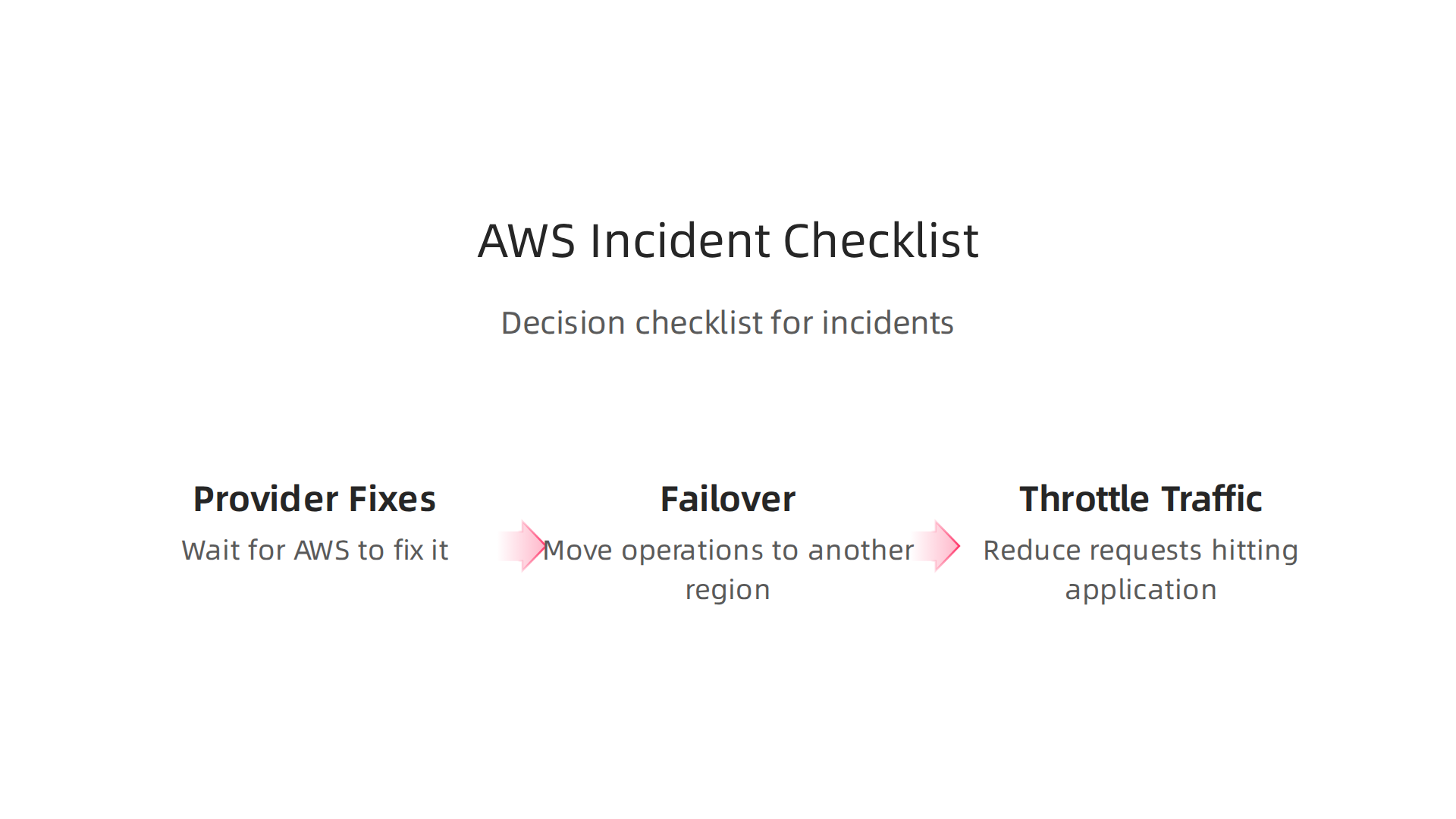
Your Decision Checklist During an AWS Incident
Making the right choice quickly can save your business from bigger problems.
-
Rely on Provider Fixes (Wait and See):
Sometimes, the best thing to do is wait for AWS to fix it. This is often the case for small issues that don’t affect your main services too much. If theaws statuspage says they know about the problem and are working on it, and your systems are still mostly working, you might just keep an eye on things. This makes sense when the problem is widespread, meaning AWS has the full attention and resources to fix it fast. -
Failover (Move to Safety):
If theaws statusshows a big problem affecting a whole region, or if your most important databases likeaws auroraorcloud native pgare down, you might need to move your operations. This means switching your traffic to another AWS region or even to a different cloud provider if you have that setup. This is a big step, usually saved for critical services when the problem is severe and lasting a long time. Making sure your databases can move safely is a key part of improving resilience, as you can learn more about in Improving database resilience with observability and chaos testing. -
Throttle Traffic (Limit Who Comes In):
Imagine your system is a store, and suddenly the doors are too narrow for everyone to get in. If you have too much traffic during an AWS issue, it can make things worse. By "throttling traffic," you reduce the number of people or requests hitting your application. This can prevent your own systems from crashing. For example, if a part of your system like anaws ecrpipeline is struggling to pull images, throttling traffic might give it a chance to catch up and recover. It’s about protecting your remaining healthy services.
Keeping Everyone in the Loop: Communication Best Practices
During a crisis, good communication is just as important as technical fixes.
- Be Clear and Fast:
As soon as you know there’s a problem, tell everyone who needs to know. Don’t wait until you have all the answers. Share what you know, even if it’s just that you’re investigating. - Who Needs to Know:
This includes your team members, other engineering teams, management, and even your customers. For customers, use simple language and explain how the problem might affect them. - Regular Updates:
Even if nothing changes, send updates often. This shows you’re on top of the problem. Tell people when you expect the next update, even if it’s just in 30 minutes.
Having a clear plan and good communication helps your team act as one, even when cloud services are facing their own challenges. Learning how to manage these complex situations is part of being a successful engineering team in 2026. For more on handling modern software development practices, including incident response, check out Context Engineering The 2026 Guide For Agile And DevOps Teams.
Staying informed about broad technology changes, including what’s new in AI, can also help you be ready for future challenges. Get clear daily AI updates from The AI Newsletter Worth Reading.
Comparing AWS Status to Third-party Monitoring & SLAs
While staying informed about tech changes is smart, it’s also key to look closely at what your cloud provider promises. The basic aws status page tells you about big issues. But your business needs more. It’s like checking the weather report versus having your own sensors inside your house to see if a small leak is growing.
What Are SLAs and Why Do They Matter?
SLAs are Service Level Agreements. Think of them as promises a company like AWS makes about how well their services will work. For example, Amazon promises that its EC2 computing service will be available almost all the time, about 99.99% of the month, in each region, according to their Amazon Compute Service Level Agreement. If they don’t meet this promise, you might get some service credits back.
But here’s the thing: the aws status page shows if AWS has a problem. An SLA tells you what happens to you when they have a problem. You need to understand how an aws aurora database going down for a few hours really affects your business sales or customer trust, not just that AWS is "working on it." Sometimes, even a short outage can break important promises you’ve made to your own customers, making the SLA implications for you very real.
When to Look Beyond AWS Status
Relying only on the official aws status is often not enough. Imagine a big cloud problem, like the global cloud failure that happened in March 2026. Such an event shows that sometimes, you need more than one source of truth or even more than one cloud. A big outage can expose how important it is to have other options, as seen during the AWS Outage March 2026.
-
Third-party Monitoring Tools: These tools watch your specific applications and services, not just the whole AWS cloud. They can tell you if your
aws ecrimage pull is slow, or if yourcloud native pgdatabase is having problems, even when the overallaws statuslooks green. These tools give you a deeper, more personal view of your systems. This helps you react faster to problems that affect only you. To truly keep an eye on your cloud setup, your basic AWS console might not be enough anymore. You’ll need more advanced tools for managing your cloud operations effectively, as you can learn more about in Your AWS Console Isn’t Enough Anymore. -
Multi-Cloud Strategies: This means using services from more than one cloud provider, like AWS and another company. If one cloud has a major problem, you can switch your most important services to the other. This makes your systems much stronger against big outages. It’s a bit like having a backup generator for your home. While harder to set up, it gives you the best protection for your business.
Summary
This article explains why tracking AWS status is essential for maintaining database-driven applications and how AWS communicates health across global pages, regions and APIs. It covers how incidents—whether anomalies, outages, control-plane or data-plane failures—can affect services like RDS, DynamoDB, Aurora and cloud-native PostgreSQL, and how networking or regional failures can disrupt your apps. You’ll learn practical resilience patterns (Multi‑AZ, read replicas, sharding, multi‑region replication), how automated and manual failover work, and how to define and validate RPO/RTO. The guide also shows which observability tools to use, how to run chaos engineering and game days, and gives a clear incident playbook for engineering teams to decide when to wait, failover, or throttle traffic.