

Why No-Code App Builders Matter Now for Engineering Teams
It used to be that only highly skilled coders could build computer applications. But by 2026, things have changed a lot. Now, there are special tools called no-code app builders that make it much easier for everyone to create apps. These tools have become very important for engineering teams today.

So, what exactly is a no-code app builder? Imagine building something with digital LEGOs instead of drawing every piece by hand. A no-code app builder lets people create applications using a visual interface, like dragging and dropping parts onto a screen What Is a No Code App Builder? A 2026 Enterprise Guide.
You don’t need to write any complex computer code. These platforms come with ready-made parts, simple logic blocks, and templates. They let you make a working app quickly 11 Best No-Code App Builders in 2026.
No-code platforms are changing how we build software. They help engineering teams work much faster. They also allow people who are not traditional developers to create useful tools and apps for their company. This means more ideas can become real applications quickly, which helps companies try new things faster. Modern no-code platforms are powerful. They can handle complicated data and connect to many other business systems No-Code Revolution: Enterprise Applications 2026. This way of building apps, often as cloud based application solutions, is truly transforming how software development happens how building without code is transforming software development in 2026. Many of these platforms also offer an AI advantage, letting users simply describe what they want in plain words and watch the system build it.
But it’s not all simple. While a no-code app builder brings speed and lets more people create, engineering leaders also need to think about some trade-offs. For example, how much control do you really have over the app? Will it be easy to keep updated and change in the future? These are important questions about control and maintainability that teams must consider.
Understanding these tools, along with their benefits and drawbacks, is key for any team looking to build smarter and faster in 2026. If you want to stay updated on how AI is changing tech, including the future of app building, you should check out The AI Newsletter Worth Reading.
What Is a No-Code App Builder? Core Concepts Explained
To truly grasp the power of a no-code app builder, it helps to look inside and see how these tools work. Modern no-code platforms are more than just simple visual editors; they are complete environments that handle many parts of building an application The Architect’s Guide to No Code App Builders in 2026. Let’s break down the main pieces that make up a typical no-code app builder.
The Building Blocks of a No-Code Platform
At its core, a no-code app builder provides several key components that let you create apps without writing code:
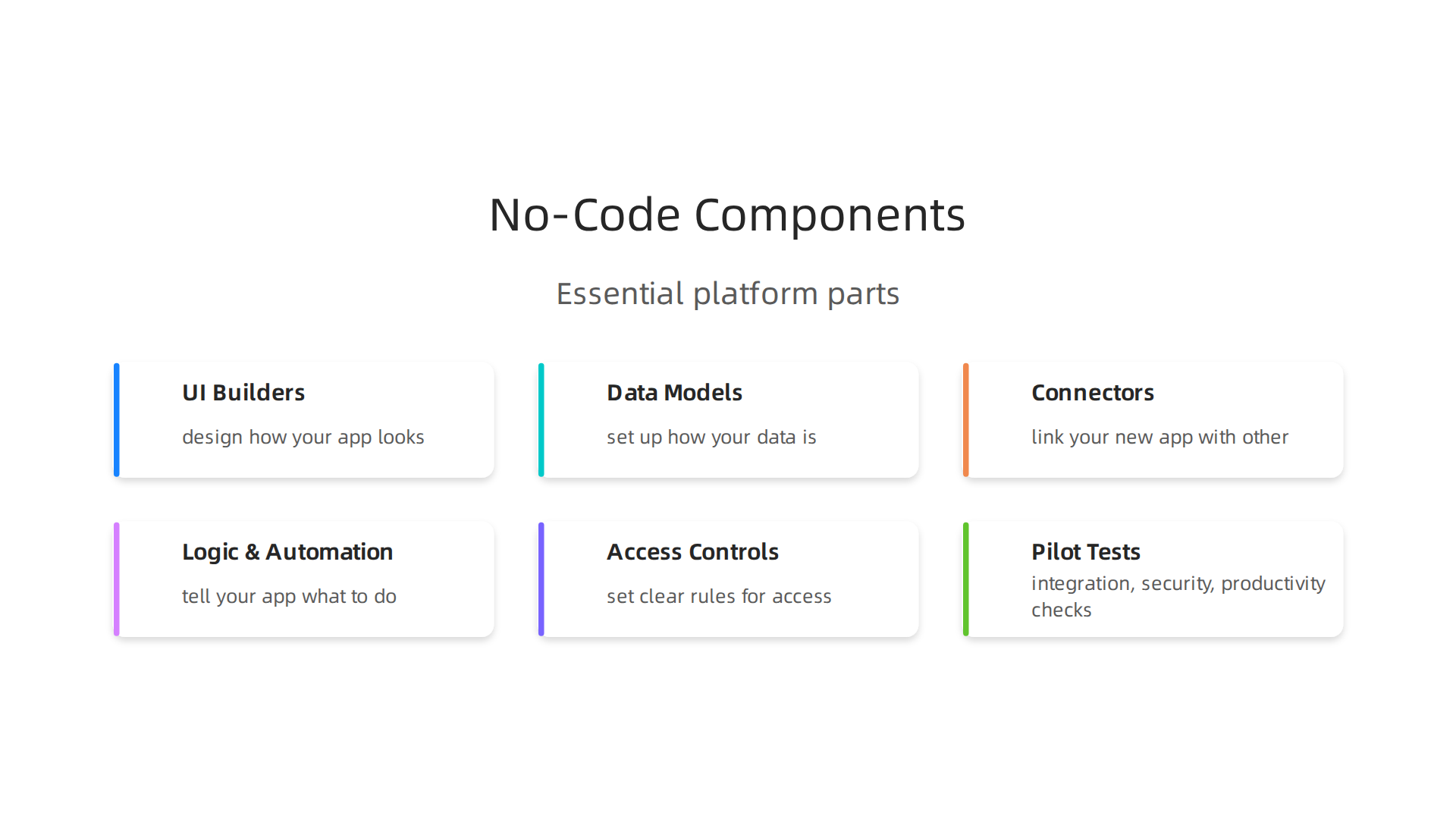
- User Interface (UI) Builders: This is where you design how your app looks. You’ll find a visual editor with drag-and-drop tools, ready-made buttons, text boxes, and other elements. You simply pick what you need and place it on the screen.
- Data Models: Every app needs to store information. No-code platforms offer easy ways to set up how your data is organized, like a smart spreadsheet. You can define different types of information and how they relate to each other. This is crucial for creating dynamic, cloud based application solutions.
- Connectors and Integrations: Apps often need to talk to other software, like your email system, payment processors, or a customer database. No-code tools come with pre-built connectors that make it simple to link your new app with other services, expanding its capabilities.
- Logic and Automation Rules: This is where you tell your app what to do. Instead of writing complex code, you set up rules. For example, "when a user clicks this button, save the data here and send an email." This makes the app intelligent and responsive. Some platforms even include an
AI advantagewhere you can describe a function in plain words, and the system tries to build it for you.
Together, these parts allow you to create a working no-code app builder solution. They simplify the complex world of software development into manageable, visual steps.
No-Code vs. Low-Code vs. Custom Development
It’s important to understand how no-code app builder tools differ from other ways of creating software:
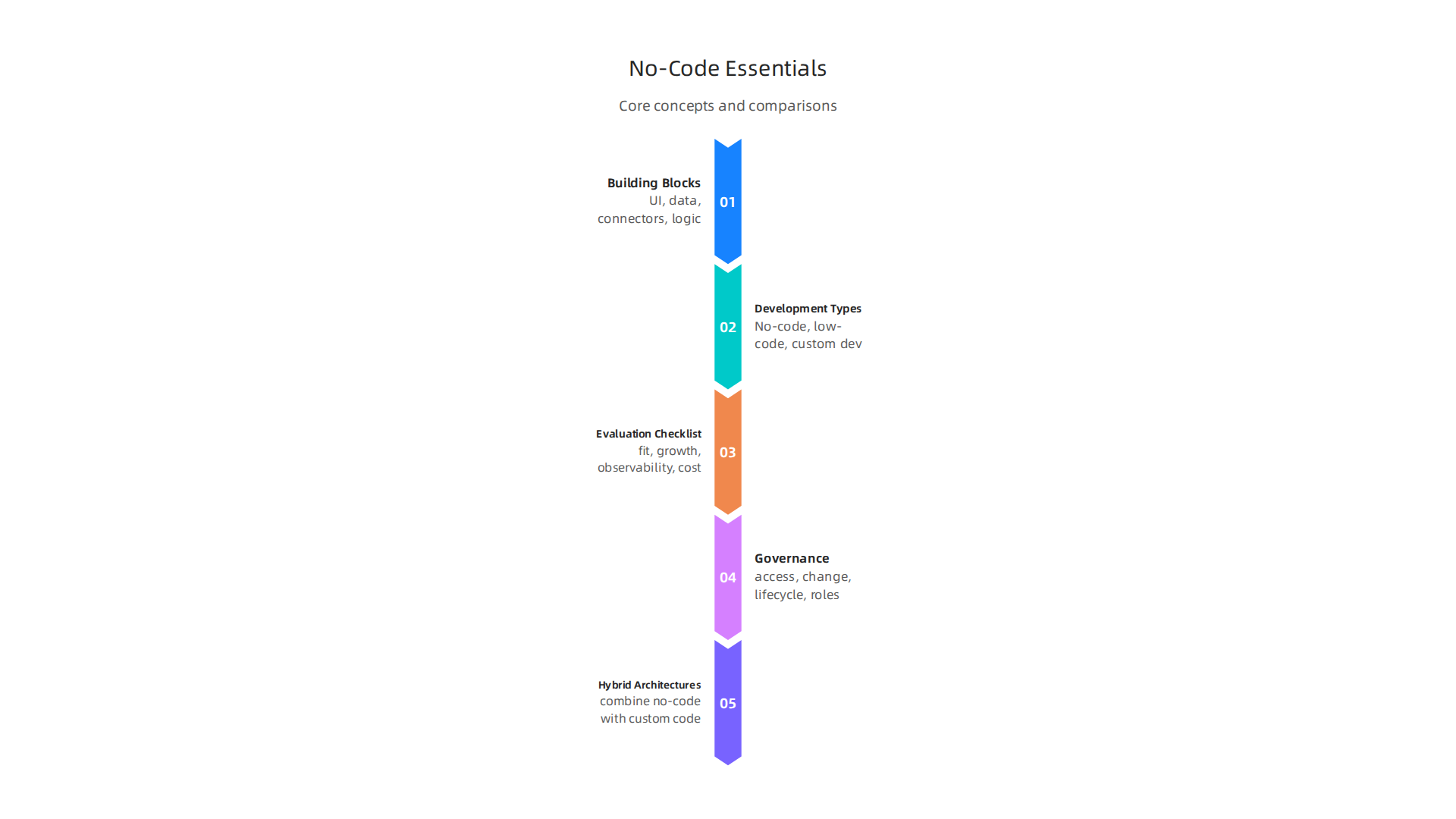
- No-Code Development: As we’ve discussed, this means building applications entirely with visual tools, without writing any traditional code. It is mainly for business users, also called "citizen developers," who need to create simple, fast solutions for specific problems The State of No-Code in 2026: Market Trends and What’s Next.
The main benefits are speed and ease of use. However, you might have less control over very specific, complex features.
- Low-Code Development: This is a step up from no-code. Low-code platforms also offer visual tools and pre-built components, but they allow and even encourage developers to add their own custom code when needed. This means you can build more complex applications that require unique features or deeper integrations. Low-code is often used by professional developers or teams who want to speed up development while still maintaining some coding flexibility Low-Code and No-Code in 2026: Building Smarter, Faster, ….
- Custom Development: This is the traditional way of building software, where skilled programmers write every line of code from scratch using programming languages like Python or Java. Custom development offers the most control, flexibility, and scalability. It’s best for highly unique applications, systems that need to handle very specific performance demands, or solutions with extreme security requirements. However, it takes more time, costs more, and requires specialized skills.
Choosing between these options depends on your project’s needs, the skills of your team, and how much control you need over the final product. Understanding these differences helps engineering teams make informed Strategic Choices for Developer Tools and Cloud Platforms in 2026.
Top Use Cases: Where No-Code Delivers the Most Value
Now that we understand what a no-code app builder is and how it works, let’s explore the most common ways companies use these tools today. No-code platforms are great for solving specific problems quickly and efficiently, especially when you need to build applications for internal teams or simple customer interactions.
Building Smart Internal Apps
One of the biggest benefits of a no-code app builder is how fast you can create apps that help your own team. These are often called internal tools.
Here are some examples of high-impact internal apps:
- Custom Dashboards: Imagine needing a simple screen to track sales, project progress, or customer support tickets. A no-code app builder lets you pull information from different places and show it in a clear, easy-to-read way. This helps teams make faster decisions.
- Admin Tools: Managing users, inventory, or settings for other systems can be tricky. No-code helps you build simple screens for your staff to update information without needing a developer every time.
- Approval Workflows: Many businesses have processes that need approvals, like vacation requests, expense reports, or new project ideas. With no-code, you can create apps where people can submit requests, and managers can approve or deny them with a click. This makes things move much faster. In fact, many organizations see a 65-70% faster approval time when using no-code for these tasks No-Code Statistics 2026: Adoption, ROI & Market Data.

These internal apps often run as a cloud based application, meaning they are available to your team wherever they are, using the internet. Learning how building without code is transforming software development in 2026 can show you more about this shift.
Simple Customer-Facing Forms
While no-code is great for internal uses, it’s also useful for creating lightweight customer-facing tools. Think about things that gather information from users but don’t need super complex features.
- Online Forms: You can quickly build forms for customer feedback, event sign-ups, lead capture, or quick surveys. These forms can look professional and be added to your website easily.
- Basic Portals: For simple needs, an app builder no-code can help create a small portal where customers can view basic information or submit support tickets. If you need a more advanced solution, you might want to consider a comprehensive guide to design, security, and scalability for a web portal.
How Product Teams and Engineering Benefit
No-code isn’t just for business users. Product teams and even engineering departments can get a lot of value from it too.
- Rapid Prototyping: Product teams can quickly build and test new ideas or features with a no-code app builder.

This means they can get feedback from real users much faster, without waiting for developers to write a lot of code. It’s like sketching an idea, but with a working app.
- Delegated App Ownership: When business teams can build their own simple apps, it frees up engineers to focus on more complex, core projects. This is a huge benefit, as IT teams often report a 50% reduction in their backlog when business teams handle simpler apps themselves No-Code & Low-Code Statistics 2026.
- AI Advantage: Newer no-code tools sometimes include an
AI advantage. This means you can describe what you want the app to do in plain words, and the AI helps build it. This can make the process even quicker for product teams. If you’re curious about this, you can learn more about top no-code machine learning platforms and prompt engineering tips for 2026.
Overall, no-code solutions help businesses big and small create tools faster, save time, and let more people contribute to building useful applications. If you want to keep up with the latest in technology and how AI is changing software, make sure to read The AI Newsletter Worth Reading.
While no-code tools are great for making apps quickly, it’s also important to think about the technical side of things. How well can your app grow? How safe is your information? And can it talk to other systems your business uses?

Let’s look at these important points for any no-code app builder.
Growing Your App: Scalability
Scalability simply means how well your app can handle more users, more data, and more activity without breaking down or becoming too slow. A good no-code app builder should let your app grow with your business.
Here’s what to consider:
- User and Data Limits: Every no-code platform has limits. Think of them like the speed limit on a road or how many cars can fit in a parking lot. These limits can be for how many people can use the app at once, how much data it can store, or how many times it can connect to other services using APIs. It’s smart to know these limits before you start building, especially if you expect your app to become very popular or handle a lot of information. Checking these limits early helps avoid issues later on Scaling No-Code: When You Should (and Shouldn’t) Rethink Your Stack.
- Performance: If your app becomes slow when many people use it or when there’s a lot of data, that’s a performance issue. This can mean long loading times or slow responses from the app. When scaling, you need to watch how fast your app runs, especially with many users or large data sets Are No-Code Apps Scalable? What Non-Tech Founders Need to Know. You might need to make sure your app’s data is set up well or that it doesn’t try to fetch too much information at once.
- Architectural Constraints: Sometimes, a no-code app builder might hit a wall if your needs become too complex or demand very high volumes of transactions. For example, if your app needs to do many complex actions at the same time, or process huge amounts of data very quickly, a no-code system might start to struggle. When you plan to have very high volumes, it’s better to pick platforms that are known for scaling well from the start Scaling No-Code Systems: Strategies for Growth Without Breaking.
It is also good to understand how improving your website’s speed can boost website traffic and SEO rankings, which is a key part of performance.
Keeping Things Safe: Security and Data
Security is super important, especially when dealing with sensitive information. No-code platforms usually have built-in security features, as most of them operate as a cloud based application.
- Data Protection: These platforms often include ways to protect your data, like encrypting it (scrambling it so only authorized people can read it). They also often have ways to make sure only certain people can log in and use the app.
- Data Residency: Sometimes, rules say where your data must be stored. For example, some countries require that customer information stays within their borders. You need to make sure your no-code app builder can meet these specific data storage rules.
- Enterprise SSO: For bigger companies, Single Sign-On (SSO) is a common security feature. It means employees can use one login (like their company email and password) to access many different apps, including the ones built with no-code. This makes logging in easier and more secure. For industries with very strict rules, like healthcare or finance, standard no-code security might not be enough. They might need special encryption or ways to track everything that happens in the app, which could require some custom development No-Code Limitations: Signs You Need Custom Development.
For teams wanting to improve their security posture, exploring topics like cloud-native SIEM elevates AI-powered cloud security 2026 can offer deeper insights into protecting applications.
Connecting to Other Systems: Integrations
Most apps don’t live alone. They need to share information with other tools you use. This is where integrations come in.
- API Access: Many no-code platforms let your app connect to other services using APIs (Application Programming Interfaces). Think of an API as a waiter in a restaurant. You tell the waiter what you want (e.g., "get customer data"), and they go to the kitchen (the other service) and bring it back. This allows your app to pull information from a customer database or send details to a marketing tool. It’s important that the no-code platform manages how often your app can call these APIs to prevent problems What is API Rate Limit in No-code?.
- Webhooks: Webhooks are like automatic messages. When something specific happens in your no-code app (like a new customer signs up), it can automatically send a message to another system (like your email marketing tool) to trigger an action.
- Connecting Challenges: While useful, some no-code integration tools might struggle with very large amounts of data or very frequent updates because they are built for ease of use over extreme performance The Hidden Limitations of Low Code and No-Code Integration Platforms.
Understanding these technical aspects helps you choose the right no-code app builder for your specific needs, making sure your app is not only built fast but can also grow safely and connect well with your other business tools.
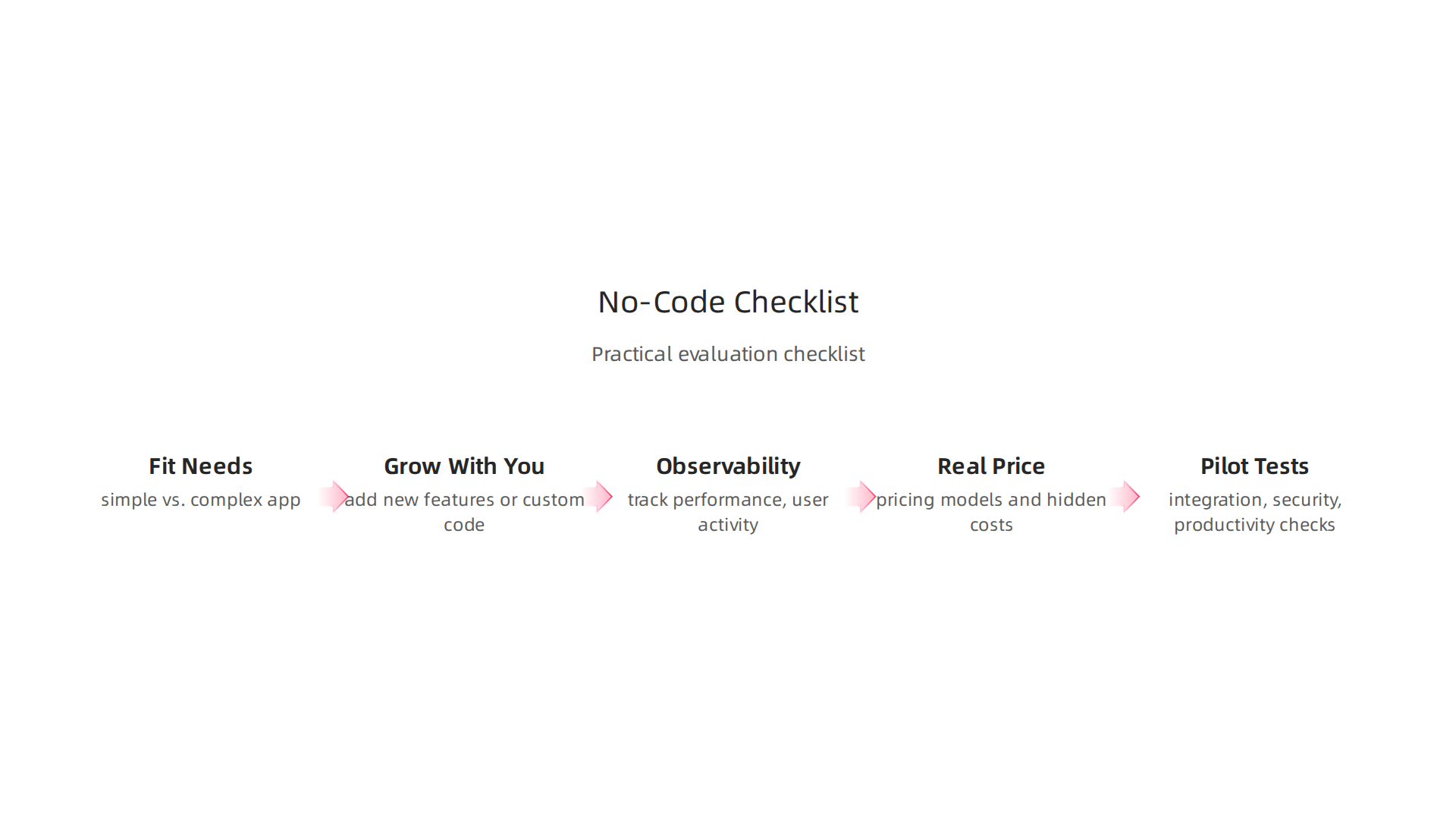
Now that we’ve talked about the technical details of no-code tools, let’s look at how to pick the right one. It’s like choosing the best tool for a job; you need a checklist. This checklist will help you find a great no-code app builder that fits your needs now and in the future.
How to Evaluate No-Code App Builders: A Practical Checklist
Picking a no-code app builder needs careful thought. It’s not just about how fast you can build something. You need to think about what your app will do, how it will grow, and how much it will really cost over time.
1. Does It Fit What You Need? (Use Case)
The first step is to be very clear about what your app will do.
- Simple vs. Complex: Is your app going to be simple, like a basic form, or complex, like a full online store or a system that manages many different tasks? Some no-code tools are great for simple things, while others can handle more complex projects. If your app needs to do many complex actions, some no-code systems might struggle with those limits The Automator’s Dilemma: Finding the Limits of No-Code Systems.
- Industry Needs: Do you work in a special area like health or finance? These areas often have strict rules about security and privacy. Make sure your chosen no-code platform can meet these tough demands.
2. Can It Grow with You? (Extensibility and Vendor Lock-in)
Think about the future. Will your app need new features or connect to custom systems?
- Extensibility: This means how easy it is to add new features or custom code if the no-code builder doesn’t offer something you need. Can you connect to custom parts of your business, or add a special bit of code to make your app unique? Being able to extend your app is key for long-term use.
- Vendor Lock-in: What happens if you want to switch to a different platform later? Can you easily take your data and move your app to another tool? Some platforms make it hard to leave, which is called vendor lock-in. You want to choose an app builder no-code solution that gives you options. You want to avoid issues when your app hits its limits and you need to move to another solution What to Do When Your No-Code App Hits Its Limit.
3. Can You See What’s Happening? (Observability)
Observability means being able to tell how your app is doing at all times.
- Tracking Performance: Can you see how fast your app is running? Are there any errors? You need to know if users are having problems or if a part of the app is slowing down. Monitoring these things helps you fix issues quickly. Learning about how building without code is transforming software development in 2026 can give you more insight into this.
- User Activity: Being able to track what users do in your app helps you make it better. This is especially important for a cloud based application where many users might be active at once. Good observability features are important for keeping your app running smoothly and improving it over time How to Scale Your No-Code App: Essential Tips.
4. What’s the Real Price? (Total Cost of Ownership – TCO)
The price tag for a no-code app builder is not just the monthly fee.
- Pricing Models: No-code platforms have different ways of charging. Some charge per user, some per app, and some based on how much you use the platform (like how much data you store or how many times your app talks to other services). In 2026, these costs can range from $15-$60 per user per month, or $500-$5,000 per app per month for enterprise solutions No-Code Platform Total Cost of Ownership (TCO).
- Hidden Costs: Think about extra costs like connecting to other services, extra storage, or special features. These can add up. The total cost of ownership (TCO) looks at all these costs over time, not just the basic subscription How to Evaluate No-Code Platforms: A 6-Criteria Framework for Security, Scalability, and Total Cost of Ownership. It’s helpful to compare the costs of different platforms, as pricing varies a lot in 2026 No-Code Platform Pricing Comparison 2026: Full Cost Breakdown.
5. Trying It Out: Pilot Tests
Before you commit to a no-code app builder, it’s smart to do some small tests.
- Integration Tests: Try connecting your new no-code app to one of your existing business tools. See how easily they share information. This will show you if the platform’s integration features truly work for your setup.
- Security Audits: For sensitive apps, run a small security check. Make sure your data is safe and that only the right people can access it.
- Developer Productivity: Have a small team build a pilot app and track how fast they can get it done. This gives you real numbers on how much time and effort your team will save using that specific no-code solution. This is a practical way to evaluate technology services and prevent failures.
By using this checklist, you can make a smarter choice when picking a no-code app builder. It ensures your app will not only be quick to build but also strong, secure, and able to grow with your business.
Staying on top of the latest in tech can help you make these informed decisions. Get daily, clear updates on AI and technology trends.
The AI Newsletter Worth Reading
After choosing the best no-code app builder for your needs, the next big step is making sure you use it wisely over time. This is where "governance" and "best practices" come in. It’s like having good rules for a game to make sure everyone plays fair and the game stays fun and safe for a long time.
Governance and Best Practices for Sustainable No-Code Adoption
Good governance for your no-code tools means setting up smart ways to control, manage, and guide how apps are made and used.
This helps stop problems before they start, like having too many similar apps or apps that are not secure. Keeping things organized and safe is key for your no-code efforts to last. Creatio explains that a good governance model looks at three main things: how you do things (process), who does them (people), and the tools you use (platform) Managing the Governance Model for Software ….
How to Keep Your No-Code Apps in Order
To make sure your no-code setup runs smoothly, you need some clear rules:
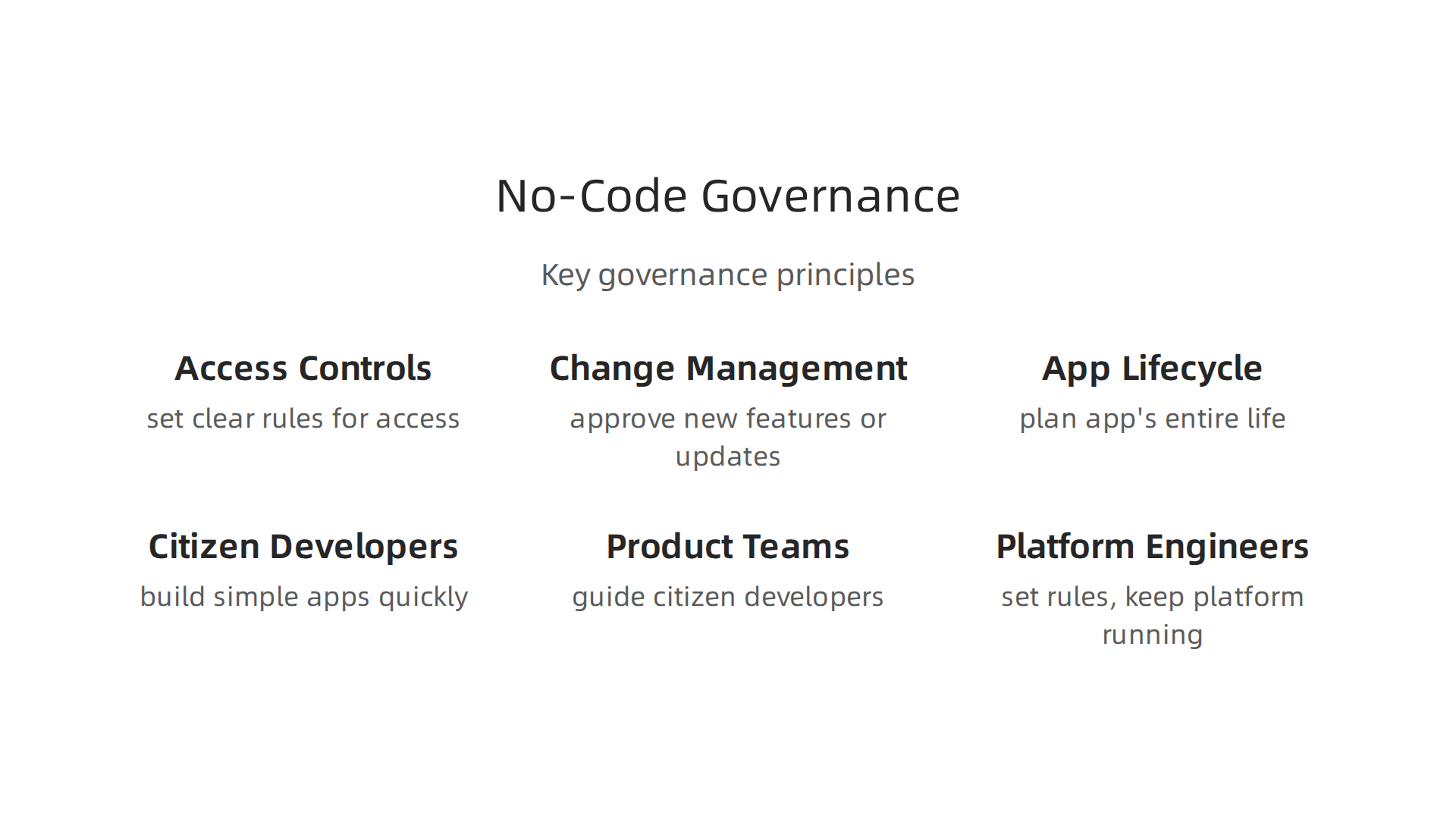
- Access Controls: Think about who gets to build apps and who can see sensitive information. It’s super important to set clear rules for who can do what. This often means giving different people different levels of access based on their job. For example, a marketing person might only build simple forms, while an IT expert can build more complex apps and manage overall settings. This approach makes sure your data stays safe. KPMG suggests having clear guidelines for who can create applications Citizen developer enablement – KPMG International.
- Change Management: Apps are always changing. You’ll add new features or update old ones. Change management is about having a clear way to approve these changes. This means testing new ideas to make sure they work and do not break other parts of your system. It is a way to handle updates in a careful, planned way.
- App Lifecycle Policies: This covers the entire life of an app. It goes from when you first have an idea, through building and using the app, and even when it is time to stop using it. Having a plan for each step helps keep things neat and tidy. This stops "app sprawl," which is when too many unused or forgotten apps pile up. It also helps avoid "technical debt," which happens when you rush building something and create problems that cost more to fix later.
Working Together with No-Code
A big plus of the no-code app builder is that many people can build apps, not just trained programmers. This means different teams need to work together well.
- Citizen Developers: These are people in your business who know a lot about their daily tasks. With a no-code tool, they can quickly make simple apps to fix their own problems, which saves a lot of time. They need clear guidelines and support from others.
- Product Teams: These teams focus on what users need and what the business wants to achieve. They can work with citizen developers to guide them. This helps make sure the apps fit into the company’s bigger goals.
- Platform Engineers: These are the experts in how the no-code system actually works. They set up the main rules, keep the platform running well, and help other teams when they get stuck. They create "guardrails" that let citizen developers build safely without blocking them from being creative Citizen developer governance: preventing sprawl when non-devs …. This makes the whole process smoother and improves the Developer Experience 2026: A Practical Roadmap for Engineering Teams.
As we move into 2026, using artificial intelligence (AI) tools with your no-code app builder can bring even more power, giving you an AI advantage. This is especially important for a cloud based application, where keeping data safe and ensuring things run fast are super important. Clear governance makes sure these powerful tools are used smartly and securely.
Good governance is essential for your no-code journey. It helps you get the most out of your no-code app builder while keeping everything secure, organized, and ready for what comes next.
Good governance is essential for your no-code journey. It helps you get the most out of your no-code app builder while keeping everything secure, organized, and ready for what comes next. Sometimes, though, a no-code app needs a bit more power or a special touch that only custom code can give. This is where "hybrid architectures" come in.
Hybrid Architectures: Combining No-Code with Custom Development
Imagine your no-code app builder is like a super easy way to build the main parts of a house, like the walls and roof. But what if you need a special, custom-built kitchen with unique appliances? You would hire a specialist for that, then connect it seamlessly to your ready-made house. This is what hybrid architectures do for apps. They let you combine the speed and ease of a no-code app builder with the deep power of custom-made code.

You might do this when a task is very complex, needs to handle huge amounts of data, or has very specific security needs. For these harder jobs, you can create a custom piece of software, often called a "service," using traditional coding. This service then works together with your no-code app. The no-code app handles the easy parts, like what users see and how they click buttons, while the custom service takes care of the heavy lifting behind the scenes. This way, you get the best of both worlds: quick building for most of your app and powerful custom solutions for special tasks.
For example, a no-code platform might be great for creating a customer sign-up form and basic user profiles. But if you need to run a very smart AI prediction model on all your customer data, that might be a job for a custom-coded service. This approach helps your cloud based application stay fast and secure, giving you an AI advantage when it comes to advanced features.
How to Make Hybrid Apps Work Well
When you mix no-code with custom code, you need a few smart ways to make sure they play nice together:
- API Design (How Apps Talk): Think of an API as a special menu that custom services offer. Your no-code app can "order" specific actions or information from this menu. Good API design means making this menu clear and easy to understand so your no-code app builder knows exactly how to ask for what it needs. This ensures your custom code and no-code parts communicate smoothly. You can learn more about how different parts of cloud systems connect in our guide to cloud services examples.
- CICD Integration (Smooth Updates): CICD stands for Continuous Integration and Continuous Delivery. It’s a fancy way of saying you have a system that automatically builds, tests, and updates your app whenever you make changes. For hybrid apps, this means setting up a process where both your no-code changes and your custom code changes can be tested and released together. This makes updates less risky and faster. Many teams use modern methods to improve their workflow, ensuring a better Developer Experience 2026: A Practical Roadmap for Engineering Teams.
- Testing Strategies (Making Sure It Works): When you have two different parts working together, you need good tests. This means testing each custom service by itself to make sure it does what it’s supposed to. Then, you also need to test the whole hybrid app to make sure the no-code part and the custom part work perfectly as one. This helps find problems early, so your users have a smooth experience.
By following these best practices, your business can use a no-code app builder to create powerful, flexible applications. It lets your teams build quickly for everyday tasks while still being able to add cutting-edge, custom features when needed, unlocking the full potential of your software ideas in 2026.
If you’re eager to stay on top of all the latest advancements in technology, especially AI, you’ll love this next recommendation. Get clear daily AI updates from The AI Newsletter Worth Reading.
Summary
No-code app builders let teams create applications with visual tools instead of hand-written code, speeding delivery and opening development to non-programmers. This article explains what modern no-code platforms include—UI builders, data models, logic rules and integrations—and compares no-code to low-code and traditional development so you can choose the right approach. It walks through the highest-value use cases (internal tools, forms, prototypes), then dives into technical concerns like scalability, performance, security, API limits and observability. You’ll get a practical checklist for evaluating vendors, guidance on costs and pilot testing, plus governance and best practices for managing citizen developers and avoiding app sprawl. The piece also shows how hybrid architectures let teams mix no-code frontends with custom backend services for advanced needs. After reading, engineering leaders will be able to assess when no-code fits, choose appropriate platforms, and plan secure, scalable adoption in their organization.


