

In today’s fast-paced world, building great websites can be tricky for teams. Designers want to create beautiful, interactive pages, while developers need to make sure those pages work perfectly and are easy to update.

Often, moving from a design idea to a live website takes a lot of time and effort. This can slow down companies and make it hard to get new ideas out quickly. Teams need faster ways to turn designs into working websites without giving up quality or control for developers.
This is where the Framer website builder comes in. It helps teams build websites much faster by bringing design and development closer together. It lets designers create websites with real web elements, and it even helps developers turn parts of those designs into working code, like React components, which many developers love to use, as noted in a 2025 guide on How to Export from Framer. This means teams can launch websites that look great and perform well, all while keeping a good level of control over the technical details.
In this article, we’ll look closely at the Framer website builder. We will explore its key features and how different types of teams, from small startups to big companies, can use it. We’ll also compare Framer to other tools, see how it fits into different ways of working, and understand how teams can decide if it’s the right choice for their next big project. If you’re looking for ways to build without writing all the code yourself, a tool like Framer can be a game-changer. You can learn more about similar options in our no-code app builder strategic guide for engineering teams.
Keeping up with technology and new tools is key for anyone in software.
The AI Newsletter Worth Reading
Want to stay ahead with the latest in AI and tech? Get clear, daily updates right to your inbox.

Get clear daily AI updates from The Deep View Newsletter.
The Framer website builder is a special tool that helps people create websites. But it’s good to know exactly what it does and what it doesn’t. Think of Framer as a smart drawing board for websites.
How Framer Works
At its heart, Framer gives you a big, open space to design your website. You can drag and drop parts like text, pictures, and buttons right onto your page. This is called a visual design surface. It means you see exactly what your website will look like as you build it, without needing to type in complicated code.
But Framer is more than just a simple drag-and-drop tool. It also lets developers work with the designs. For example, if a designer creates a cool button in Framer, a developer can turn that button into a piece of reusable code, like a React component. This makes it easier to use the same button across many projects or add special features that only code can do. This ability to mix visual design with real code is what makes the Framer website builder stand out. In fact, many developers use plugins to convert Framer designs into React components, as detailed in guides on how to export a Framer site. You can even watch a video on how to export code from Framer to see this in action.
What Framer Is Not (and What That Means for You)
Here’s an important point: while Framer helps bridge design and code, it’s not made for downloading your entire website as simple HTML, CSS, and JavaScript files to host anywhere you want. Most of the time, websites you build with Framer live on Framer’s own servers. This means it often doesn’t allow direct code export of the whole site. If you need to host your site somewhere else, you might need special tools that can convert a live Framer site into static HTML, CSS, and JavaScript files, as noted in a 2026 guide on exporting and moving from Framer to HTML.
So, when you create a website with Framer, it is usually hosted by Framer itself. These websites are often what we call "static" websites. This means the pages are mostly fixed and don’t change much based on who is visiting them, making them very fast. For developers, this setup means they have control over the parts they build as code components, but less control over the main website’s code structure and where it’s hosted.
Learning about different ways to build websites can really help your career. If you’re looking to improve your skills, consider exploring courses that cover various development approaches. To grow in this field, it is also important to learn about strategic website software design for engineering teams.
For developers, the Framer website builder offers a mixed experience. While it’s great for design, how it handles code and parts of a website can be different from traditional development.
Developer experience: code export, components, and extensibility
When you build with Framer, you can create special parts called components. Think of a component as a reusable block, like a button or a navigation bar. Framer lets you turn these visual designs into actual code. For example, many developers use a special tool called the React Export plugin to convert their Framer components into React code. This means you can take a design element made in Framer and use it in your own code projects.
This ability to export individual components as React code is very helpful for teams. It means designers can create things quickly in Framer, and developers can then easily add those exact designs into their ongoing software projects.

This helps teams work together better, making sure the final product looks just like the design. It also means developers can bring Framer designs into their existing code bases, which is known as integrating Framer artifacts into existing repos. You can even export specific selections or layers to get visual assets and CSS code, making it easier to share small parts of a design with others, as noted in a guide on Introducing Export: The Easiest Way to Share Mockups, Assets and CSS ….
However, a key point is that Framer usually keeps the entire website hosted on its own platform. This means that for the whole site, developers don’t have the same level of control over the underlying code, or how it works with common developer tools like debugging, version control (like Git for tracking code changes), or CI/CD (which helps automate testing and deployment). In simple terms, you can’t just download all the HTML, CSS, and JavaScript files for your complete site to host anywhere you want, as many sources confirm, including discussions on Framer Export Option and Can I Export Code from Framer? Here’s the Truth.
If you need to host your Framer website builder project somewhere else and use your own development tools for the entire site, you might need special third-party services. These services can take your live Framer site and turn it into static HTML, CSS, and JavaScript files that you can download. An example of this is the Export Framer to HTML – NoCodeExport tool, which processes a published Framer URL and converts it into a downloadable zip file. This allows developers more freedom to manage and deploy their sites using traditional methods. Understanding how to build things without code but still maintain control is a big topic in 2026, and you can learn more about how building without code is transforming software development.
For professionals in the tech industry, staying updated on such tools and practices is essential.
Get clear daily AI updates. Sign up for The AI Newsletter Worth Reading.
After thinking about how websites are built, it’s also super important to check how they actually work for people visiting them. This means looking at speed, how easy they are to use for everyone, and if search engines like Google can find them. These checks are called performance, accessibility, and SEO.
Performance, accessibility, and SEO: practical checks before shipping
When you use a visual tool like the framer website builder, it’s often quick to get a site up. But sometimes, sites built this way can be slower than ones built from scratch by a programmer. It’s like comparing a pre-built house to one custom-made. The custom one might have special ways to make it extra strong or fast. In 2026, website speed is a big deal, and slow sites can make people leave before they even see your content.
To know if a site is fast, we look at special scores called Core Web Vitals. Google uses these to understand how good a website feels to users. There are three main parts to Core Web Vitals:
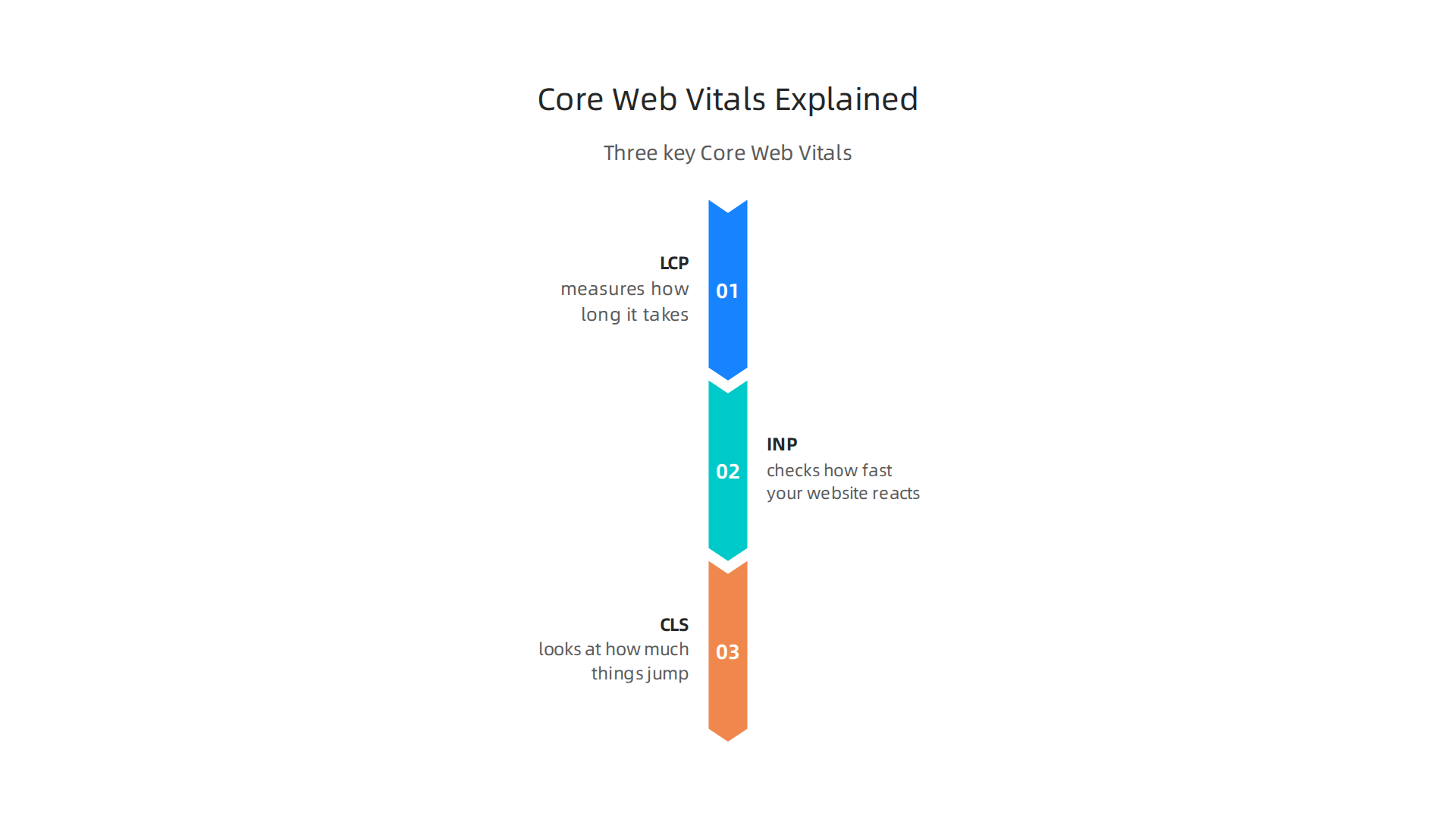
- Largest Contentful Paint (LCP): This measures how long it takes for the biggest piece of content on your page to show up. You want this to be very quick, ideally under 2.5 seconds, as highlighted in a 2026 guide on Core Web Vitals.
- Interaction to Next Paint (INP): This checks how fast your website reacts when someone clicks or taps on something. A good goal is for it to respond in less than 200 milliseconds.
- Cumulative Layout Shift (CLS): This looks at how much things on your page jump around while it’s loading. No one likes when a button moves right when they’re about to click it! You want this score to be very low, meaning things stay put.
Even though visual builders are easy, you still need to make sure your site passes these important checks. Faster websites usually mean happier visitors and better rankings in search results, which you can read more about in our guide on web performance boosts website traffic and SEO rankings. Many reports, including one comparing Website Builder vs Coding: Which Method Suits You Best, suggest that custom-coded sites can have an edge, but good builders work hard to keep up.
Beyond speed, think about accessibility. This means making sure your website can be used by everyone, including people with disabilities. For example, images should have "alt text" which describes what the picture is about for people who can’t see it. Also, someone should be able to use your whole site just with their keyboard, without needing a mouse. Always make sure your website builder creates code that works well for accessibility tools.
Finally, SEO (Search Engine Optimization) is about helping people find your website through search engines. A framer website builder can help with some SEO basics, but you need to do your part. Make sure your site has clear titles, good descriptions (meta tags), and a sitemap that helps Google understand all your pages. Also, your site must work well on phones and tablets. If your site is slow or hard to use, Google might not show it as often. Thinking about these things from the start makes a big difference for your overall website success, as explained in our insights on strategic website software design for engineering teams. Staying on top of these checks is key before your website goes live for the world to see.
The previous section talked about making sure your website is fast, easy to use, and found by search engines. But a website isn’t just a pretty face; it often needs to do things. This is where integrations come in. They help your website connect with other tools and services to add more power and features.
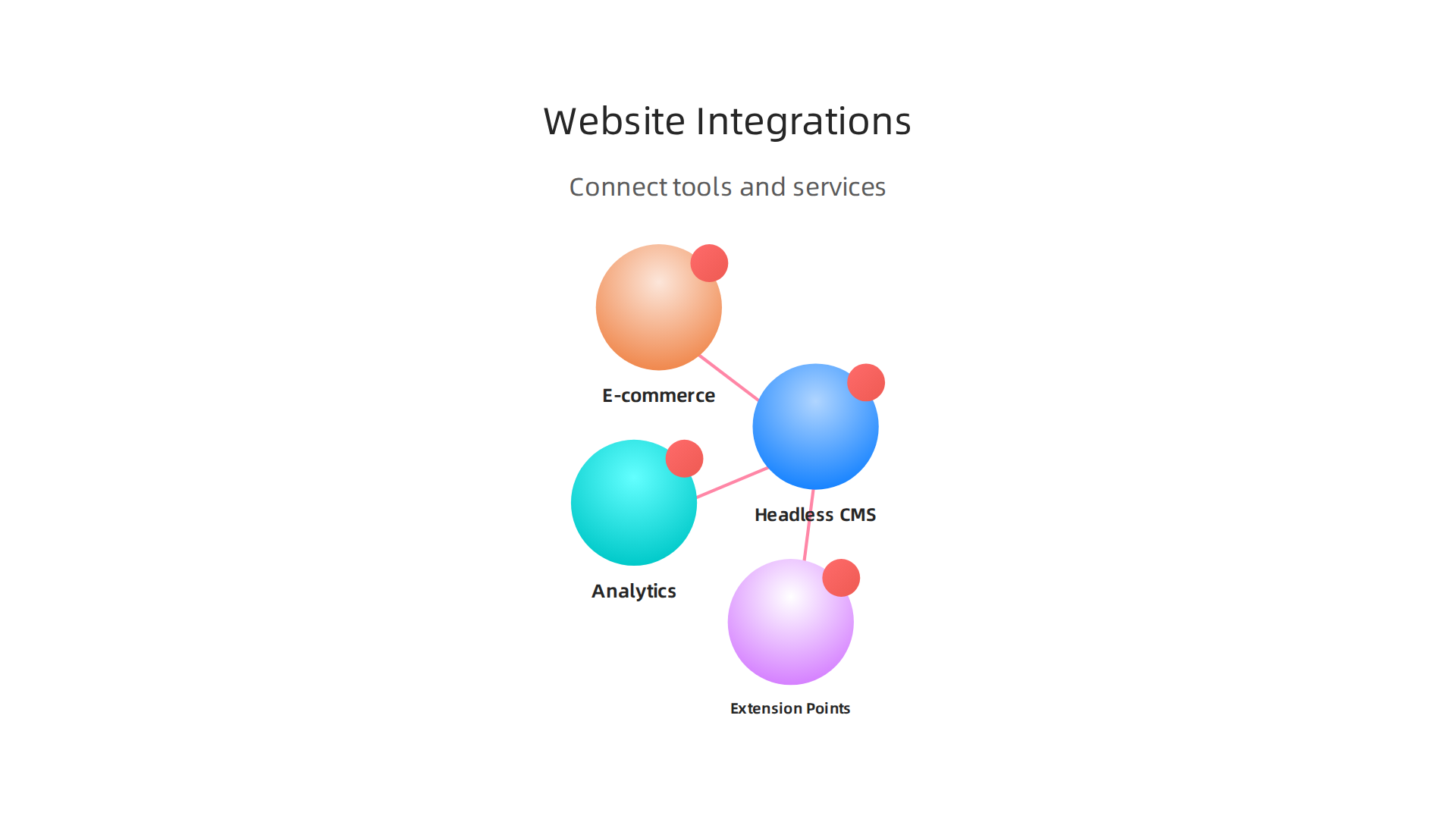
Even if you use a visual tool like a framer website builder, you’ll likely want to connect it to other systems to make it truly useful.
Headless CMS Connectors
Think of a website like a magazine. A headless CMS (Content Management System) is like having all your articles and pictures stored in one place, but separate from the printed magazine itself. This means you can use that content on your website, a mobile app, or even smart displays, all from the same source. A framer website builder can often connect to these systems. This way, you write your content once, and it appears everywhere you need it. It makes managing lots of information much easier. Also, some builders make it hard to move your site data out, which means a headless CMS keeps your content flexible, as shown in reports about how you mostly cannot export a site from a website builder.
Adding Analytics to Your Site
Once your website is live, you’ll want to know how people are using it. Are they finding what they need? How long do they stay? Analytics tools help you see this.

You can easily add tools like Google Analytics to your framer website builder site. These tools give you reports about your visitors, which helps you make your website even better over time. Knowing about how people interact with your site is key for any builder, from a software engineer to a casual user.
E-commerce and Payments
If you want to sell things online, your website needs to handle payments. This often means linking your site to an e-commerce platform like Shopify or a payment gateway like Stripe. Many website builders, including a framer website builder, have ways to connect to these services. This allows customers to browse products, add them to a cart, and pay securely, making your website a fully working online store.
Extension Points and Server-Side Logic
Sometimes, a visual builder can’t do everything you need. What if you have a special calculator, or need to send custom emails after someone signs up? This is where "extension points" come in. These are like little doors in your website builder where you can add your own custom code or connect to "serverless functions." Serverless functions are small pieces of code that run on a server only when needed. This lets you add special business rules or complex features to your site without having to build a whole backend system yourself. This is a big step up from just using a No Code App Builder Strategic Guide For Engineering Teams. For a software engineer, understanding these extension points means they can take a builder site and make it truly unique and powerful.
By smartly using these integrations, your website can do much more than just show information. It becomes a dynamic tool that works with many different systems, helping you build better things faster.
Want to stay informed about the latest tech and AI developments that impact how you build and integrate?
The AI Newsletter Worth Reading
Choosing the right tool for your website project can feel like a big puzzle. Should you use a visual tool like a framer website builder or have someone write all the code from scratch? The best choice depends on what your team needs and what you want to achieve. Let’s look at some important things to think about.
Who is on your team?
First, think about the people who will work on the website. If your team is mostly made of designers or marketing folks who are not experts in coding, a visual builder like Framer is often a great choice. These tools let people build and update sites without needing to know special computer languages. But if you have many software engineers on your team who love to code, a code-first approach might give them more control and flexibility. Experts suggest that if non-developers will handle the site daily, a strong visual builder is best, while developers might prefer code access.
How fast do you need to work?
How quickly do you need to get your website online or make updates? Visual builders are usually much faster. You can often launch a basic site or new pages in days or even hours. This speed is a big reason why many businesses choose them in 2026, especially for things like new marketing campaigns. Building a site from scratch with code can take weeks or months, depending on how complex it is. This is a key factor for startups looking for the best visual website builders in 2026.
Do you need special features?
Sometimes, you need very specific or complex features that a standard builder can’t easily do. This is where writing code can be better. With code, you have full control to build anything you can imagine, like special calculators or unique customer experiences. However, many framer website builder tools now offer "extension points" where you can add custom code for those unique needs, mixing visual building with custom logic. When deciding, consider your project’s "Logic" needs and how much custom work you foresee.
How important is speed for your visitors?
Website speed matters a lot for how people use your site and how it ranks on Google. If your site needs to be super fast to keep visitors happy and to score well in search results, you’ll need to pay close attention to performance. While many builders are good, a hand-coded site can sometimes be fine-tuned for the very best performance, though it takes more effort. Some experts recommend choosing a builder known for its clean performance if your website’s speed is a top concern.
Who will take care of the site later?
Websites need ongoing care. Who will handle updates, fix problems, and make sure everything keeps running smoothly? This is called maintenance. With a visual builder, maintenance often means clicking buttons to update parts or making changes in a friendly interface. With a code-first site, maintenance usually needs a software engineer to dive into the code. This can be more complex and costly over time. The "long-term maintenance burden" is a major thing to think about when you choose between building methods in 2026, as discussed in "Website Builder vs Hand Coding: Which Is Better in 2026?"
No matter what you choose, a good plan for strategic website software design for engineering teams is always important. You might even use a mix of both, which is called a "hybrid architecture." This means you might build most of your site with a visual tool but add custom code for the trickier parts. This way, you get the best of both worlds.
Want to stay informed about the latest tech and AI developments that impact how you build and integrate? Discover The AI Newsletter Worth Reading.
Even when you use a mix of visual tools and code, like with a framer website builder, you still need clear rules. This is where "governance" comes in. Governance helps make sure everyone on the team is on the same page about how the website looks, works, and is built. It’s like having a playbook for your website project.
What is Website Governance?
Website governance means setting up rules and ways of working for your website’s design and content. It answers big questions like:
- Who decides what colors and fonts (design tokens) to use?
- Who is in charge of the reusable parts (component libraries) of the website?
- Who needs to approve changes before they go live?
- How do you make sure the website stays fast and safe?
Simply put, governance is the guide for keeping your design system orderly and up-to-date. Without it, your website can become messy and hard to manage over time. Experts say that clear roles and decision-making help prevent problems and keep things consistent Design System Governance: A Guide to Prevent Drift. In 2026, many companies are setting up these systems to handle complex websites built with various tools.
Roles for Your Team
Everyone on your team plays a part in website governance:
- Designers: They use the design tokens and components to make sure new pages and features look right. They also help create new reusable parts for the component library.
- Engineers: When using a visual builder, engineers might focus on adding custom code where needed or reviewing the builder’s output. They ensure everything works well with other systems. For example, some engineers might discuss how to best handle code in visual builders on platforms like Notion software engineer intern 2026 the interview and application playbook.
- Product Managers: These team members help decide what new features are needed and make sure they fit with the overall goals of the business. They often approve new releases or big changes to the website.
Having a clear owner for each part of the design system is key to its success Design Systems governance framework. This way, everyone knows who to talk to when there are questions or ideas.
Onboarding and Maintenance
Getting new team members up to speed is also part of good governance. When a new designer, engineer, or product manager joins, they need to learn the existing rules and how to use the chosen tools, like your framer website builder. This might involve training on the builder itself and understanding the design system’s rules.
Ongoing maintenance means regularly checking that the website still meets all the standards. This includes making updates to design tokens, adding new components, and fixing any issues that come up. Governance makes sure these tasks are done in an organized way, keeping your website strong and useful for years to come. Thinking about how building without code transforms software development can help teams embrace these structured approaches for better long-term results How building without code is transforming software development in 2026.
Migration and exit strategies: avoiding lock-in and preparing for future change
Even with good governance, a time might come when you want to move your website from one builder to another, or even to custom code. This is called migration, and it’s important to plan for it early. Thinking about how you might leave a platform like a framer website builder can help you avoid being stuck later on.
Understanding Export Paths
First, you need to know what you can actually take with you. Not all website builders let you easily export your full site. Some, like Framer and Wix, might not offer a way to export your website as working HTML code at all. Others may only let you export the content, but not the design or layout Can you export a site from a website builder? Mostly no. This means if you move, you might have to rebuild a lot from scratch.
Some builders allow you to export parts of your site, like pages, blocks, or forms, often as JSON files. This can make moving content between builders that use similar structures a bit easier Page builder migration options from JSON files?. For example, moving between certain WordPress page builders might involve JSON exports. It’s smart to check what export options any visual builder offers before you commit. This helps keep your business ready for change.
Incremental Migration Strategies
Instead of moving everything at once, you can move your website in small steps. This is called incremental migration. It means you slowly rebuild or transfer parts of your site over time. For example, you might start by moving your blog posts, then your product pages, and so on. This way, your website stays online and working during the move.
This approach lowers the risk because if something goes wrong with one small part, it doesn’t break your whole website. It’s like moving furniture one piece at a time instead of trying to move your entire house at once. A strategic guide for engineering teams can help understand these processes, especially with tools like a No-Code App Builder Strategic Guide for Engineering Teams.
Keeping Business Logic Portable
"Business logic" refers to the special rules and functions that make your website work for your business. For example, how your online store calculates shipping costs, or how users sign up. When you use a builder, sometimes this logic is deeply tied to that platform. To avoid lock-in, try to keep this logic separate from the builder’s visual tools as much as possible.
You can do this by using third-party services for complex tasks or by writing custom code that can be easily moved. This makes sure that even if you change builders, your core business rules stay the same and can be plugged into a new system. Planning for this from the start is part of good strategic website software design for engineering teams.
Testing and Rollback Strategies
When you migrate, testing is super important. You need to test every part of your moved website to make sure it works just as well, or even better, than before. This includes checking how fast pages load, if all buttons work, and if your forms collect information correctly.
Also, have a "rollback" plan. A rollback plan is what you do if the migration goes wrong. It means you can quickly switch back to your old website while you fix problems. This minimizes the time your website might be broken or unavailable. Knowing how to quickly fix issues helps to keep your online presence strong. Thinking about how engineering teams evaluate technology services can help prevent such failures How Engineering Teams Evaluate Technology Services to Prevent Failures.
Staying informed about the latest in technology can help you make better decisions for your website’s future.
Get clear daily AI updates from The AI Newsletter Worth Reading.
Summary
This article explains how the Framer website builder helps teams move faster by combining visual design with usable web code, letting designers craft pages while developers extract reusable pieces such as React components. It covers how Framer works, what it can and cannot do (notably limited full‑site code export and Framer‑hosted publishing), and why that matters for control, tooling, and long‑term maintenance. You’ll learn practical checks for performance, accessibility, and SEO, how to integrate headless CMS, analytics, payments and serverless extensions, and what governance looks like for mixed design/code teams. The guide also compares visual builders versus hand‑coding, shows how to plan migrations to avoid lock‑in, and offers strategies for incremental moves and testing so teams can pick the right approach for speed, extensibility, and future change.


