

Introduction: When Progress Feels Like Stagnation
Have you ever looked at your screen and thought, "The web is kind of useless now"?

You are not alone. In 2026, the web is more powerful than ever. But for many developers, that power comes with bloat and complexity. Choosing software for website design now means wading through endless options. Debugging application problems requires understanding layers of abstraction. And even simple projects can feel overwhelming.
Part of the problem is information overload. The rapid pace of change makes it hard to spot what really matters. One day everyone talks about serverless architecture. The next, it is all about no-code platforms for app development. Should you learn a new framework or stick with what works? Even picking between Figma website templates and custom design can turn into a big decision. The noise never stops. According to the latest defining web development trends for 2026, the focus has shifted to immediacy and server-first performance.
But that does not make the choice any easier.
This article takes a close look at the real challenges behind the "web is useless" feeling. We will separate genuine problems from hype. And we will map a clear path forward so you can build great software without drowning in complexity. For a practical roadmap to help your team handle this shift, read our guide on developer experience in 2026.
And to stay ahead of AI updates without the noise, subscribe to The AI Newsletter Worth Reading.
The State of Web Development in 2026
So when someone says "the web is useless," what do they really mean? Often, it comes down to performance. In 2026, the average page weight on desktop sits at 2.3 MB. Mobile pages are only slightly lighter at 2.1 MB. That is a lot of data for a single page. And it keeps getting worse? Not quite. The good news is that page weight has finally plateaued after years of steady growth. The bad news? Only 33 percent of websites pass all three Core Web Vitals. That means two out of three websites give visitors a frustrating experience.
The biggest culprit is JavaScript. The median site ships about 468 KB of JavaScript code. That is up by a lot compared to just a few years ago. JavaScript is now the number one performance bottleneck. Third-party scripts make up 34 percent of total page weight. And mobile load times still average 8.6 seconds. Many users leave if a page takes more than three seconds. So when a site feels slow, it is not your imagination. The data backs it up.
Understanding these numbers helps you see why the "web is useless" feeling is real. Bloat, slow speeds, and complex frameworks all add up. To stay on top of these changes, you need to keep learning. Check out our guide on engineering technology trends reshaping development to see how AI and platform engineering are changing the game. According to the latest site speed statistics for 2026, the performance gap between fast and slow websites keeps growing.
That gap affects real people every time they try to load a page.
Why ‘The Web Useless’ Resonates: Core Challenges
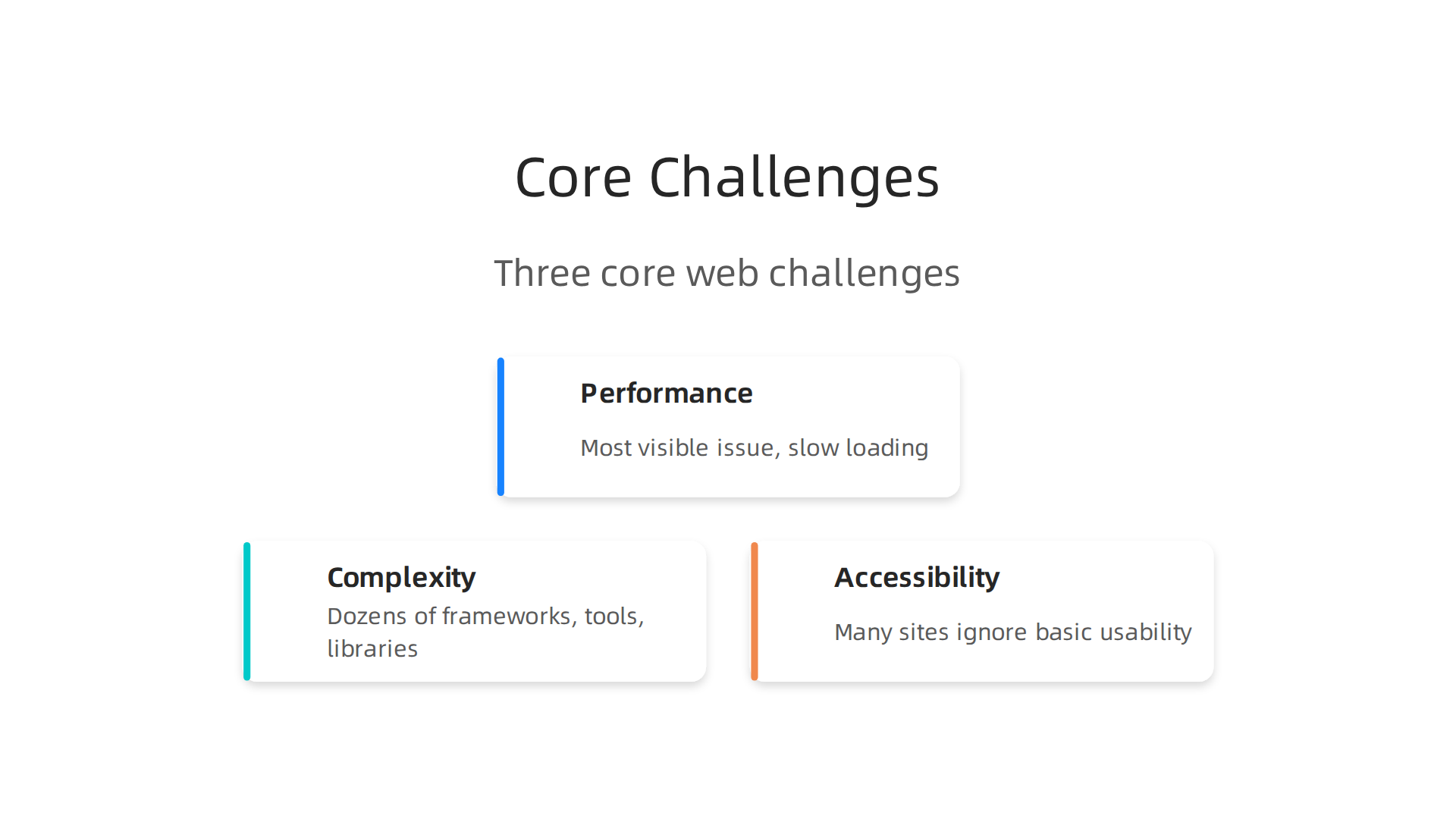
Here is the thing. The performance numbers alone do not explain why so many people now say "the web useless." There are deeper problems at play. Three interconnected challenges fuel that feeling: performance, complexity, and accessibility.
And they hit both users and developers hard.
Performance is the most visible issue. When a page takes 8.6 seconds to load on mobile, you blame the site. As the latest web design statistics for 2026 show, the median mobile page now loads 632 KB of JavaScript. That is a lot of code for a phone to process. And it makes every tap, scroll, and click feel sluggish.
But performance is only the start. Complexity is the second challenge. Building a simple website today means choosing between dozens of frameworks, libraries, and tools. What used to take a single HTML file now often requires a full build pipeline. Even basic tasks like adding a contact form can involve configuring package managers, bundlers, and APIs. This complexity frustrates developers. It also makes learning web development harder for newcomers. No wonder some people feel the platform has lost its way.
Then there is accessibility. Many sites ignore basic usability needs. Text is too small. Buttons are hard to tap. Navigation menus hide important links. The Web Almanac performance report shows that mobile interactivity metrics actually worsened in 2025 despite other improvements. That means the experience for everyday users got worse, not better.
These three problems feed each other. Slow pages make people leave. Complex tools make developers burn out. Poor design excludes entire groups of users. Over time, trust in the web as a reliable platform erodes.
Developers who want to stay effective need to cut through this noise. Instead of chasing every new framework, focus on the fundamentals. Learn what actually moves the needle for users. And keep up with what matters most in a fast-changing industry. One way to do that is to subscribe to The AI Newsletter Worth Reading. It delivers clear daily updates on AI and tech trends without the hype. That kind of focused signal helps you ignore the noise and build better websites again.
Performance Bloat and User Experience
Let us zoom in on what really makes people say "the web useless." It is the slow, bloated feeling that hits you on every page load. Data from 2026 shows the median page now weighs 2.3 MB on desktop and 2.1 MB on mobile. That is up 12% from 2024. According to the 2026 site speed statistics, images alone account for over half of that weight. And only 33% of websites pass all three Core Web Vitals. That means two out of three sites fail Google’s own baseline for a good user experience.
This bloat does not just annoy people. It costs real money. A one-second delay in page load time can cut conversions by 7%. When every second counts, a heavy site hurts your bottom line. The page speed impact on revenue report shows that 62% of traffic now comes from mobile, where 8.6 second load times are still the average. That is a recipe for losing visitors fast.
So what can developers do? The first step is to measure what matters. Track your Largest Contentful Paint (LCP), Interaction to Next Paint (INP), and Cumulative Layout Shift (CLS).
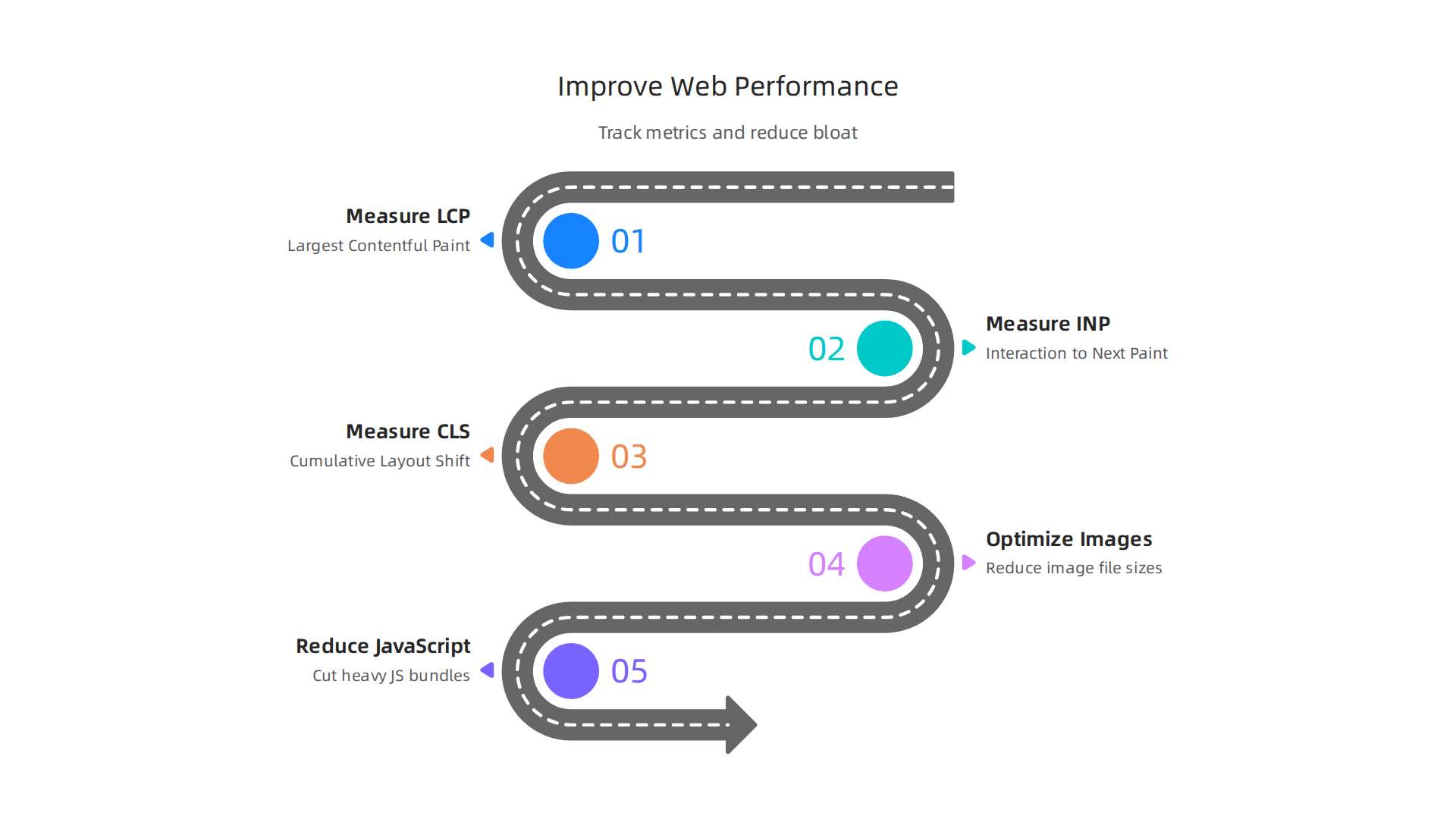
Then cut the biggest culprits: unoptimized images and heavy JavaScript bundles. Teams that focus on these basics see measurable improvements in both user satisfaction and search rankings. For a deeper look at what top performers focus on, check out this developer experience roadmap for 2026.
Complexity and Toolchain Fatigue
Here is another reason people say the web useless. It is the exhausting pace of framework churn. You learn one tool, and within a year, a new one replaces it. Developers in 2026 face an overwhelming number of choices. A recent guide on the top web frameworks that actually matter in 2026 shows that only about ten frameworks really earn attention.
The rest just add noise.
This constant learning leads to burnout. You spend time switching between software for website design, fixing application problems that come from outdated dependencies, and wondering if you should adopt the latest tool.

Many teams get stuck in decision paralysis. They cannot pick a stack, so they keep starting over.
One way to cut the fatigue is to simplify your approach. Some developers turn to no code platforms for app development or use figma website templates to skip frontend complexity. Others focus on core skills that last. If you want to stay ahead without chasing every trend, check out this guide on software developer skills for 2026. And for daily clarity on which AI tools actually help, consider signing up for The AI Newsletter Worth Reading.
Accessibility and Inclusion Gaps
Here is another big reason people call the web useless. Despite years of progress, most websites and apps still fail basic accessibility standards. That means millions of users get locked out completely.
Think about someone who relies on a screen reader. Or someone who cannot use a mouse. Or someone with low vision who needs high contrast text. When a site ignores these needs, it does more than frustrate users. It puts the company at legal risk too.
So why does this keep happening? Most teams simply do not learn enough about inclusive design. Many developers assume accessibility is someone else’s job. And the tools they use often lack good support for it.
The good news is that better tooling is emerging. Modern web components in 2026 support ARIA specs and meet WCAG 2.1 AA standards out of the box. That takes some of the guesswork out of building accessible interfaces.
If you want to build software that works for everyone, start by thinking about real user needs. Learn how to bridge the AI to human gap in your code and make inclusion a priority from day one.
The Developer Experience Crisis
But even when accessibility and inclusion are handled well, another problem makes the web useless for the people building it: the developer experience crisis. Developer experience (DX) has become a make-or-break factor in which tools and frameworks teams actually adopt. When DX is poor, innovation slows down and frustration grows. Developers waste time fighting confusing documentation, slow build processes, and tools that get in the way instead of helping.
The numbers back this up. The 2026 Developer Insights Survey shows that while AI use in production projects continues to rise, developer satisfaction with existing tools still has a long way to go. Teams that ignore DX end up with high turnover and low productivity. Talented engineers do not stick around when they spend half their day wrestling with broken tooling.
So how do you fix it? The answer starts with treating developers like real users. Give them clean APIs, fast feedback loops, and documentation that actually answers their questions. Think about the tools you choose. If a piece of software for website design makes simple tasks hard, that is a warning sign. The same goes for no code platforms for app development that promise ease but deliver complexity. Even something like figma website templates can create application problems when the handoff between design and code is messy.
Addressing DX is not optional anymore. It is what keeps your best people and helps you build better products faster.

If you want a developer experience roadmap for 2026, that is a great place to start. And to stay on top of the tools and trends that shape good DX, consider getting The AI Newsletter Worth Reading delivered to your inbox each day.
Framework Churn and Decision Fatigue
Beyond the everyday frustrations of poor tooling, there is another reason the web feels useless for developers: framework churn. Major frameworks release new versions so often that teams are constantly reevaluating their stack. Every new release brings the fear of missing out and the pressure to migrate. This rapid cycle creates decision fatigue. Instead of building features, developers spend mental energy analyzing whether to stay with a stable version or jump to the latest shiny thing.
Many teams adopt frameworks before they are fully mature. The result? Painful migration later. A look at the 10 web frameworks that actually matter in 2026 shows that picking the right one from the start can save months of rework. Yet with so many options, the choice itself becomes a burden.
To ease this fatigue, focus on proven tools and invest in learning the fundamentals. Keeping up with software developer skills for 2026 helps you cut through the noise and build a stable, productive workflow.
From SPA to SSR and Beyond
This churn has also fueled a big shift in how we build the front end. For years, single-page applications (SPAs) were the default. They offered smooth, app-like experiences but often hurt search engine optimization and initial load speed. Now the pendulum is swinging back. Server-side rendering (SSR) and static site generation are making a strong comeback.
Frameworks like Next.js and Remix show this trend clearly. The 2025 Stack Overflow Developer Survey shows that these modern SSR tools are widely popular. Teams are choosing them for better performance and SEO without giving up developer experience.
But you don’t have to pick one extreme. More teams are using incremental adoption patterns like MPA+hybrid setups. They combine traditional multi-page apps with small interactive islands. This approach lets you keep the benefits of SSR while adding rich features where needed.
The key is understanding the trade-offs. SPAs shine for highly interactive dashboards. SSR wins for content-heavy sites. Hybrid patterns work great for e-commerce and marketing pages.
To stay on top of these changes, check out the latest engineering technology trends in 2026. And for daily insights on how AI is reshaping development, get clear daily AI updates from The Deep View Newsletter.
But picking the right rendering approach is only one piece of the puzzle. The bigger question is whether the web can support your business goals at all. This tension runs straight into deep structural and business challenges that can make the web useless for many teams.
The open web gives you freedom. You own your content, set your prices, and control the user experience. Sounds great. But that same openness clashes hard with today’s business models, which are built on walled gardens like Apple’s App Store or Google Play. Those platforms offer built-in payment systems, easy discovery, and proven monetization. The trade-off is you hand over 15 to 30 percent of your revenue. For many companies, that cost feels worth it because the engagement and retention numbers are so much higher in native apps.
Monetization pressures push teams toward ads, tracking, and paywalls. These tactics can hurt user trust and make the web feel slower and more annoying. That’s a real application problem. When every site demands a cookie consent or a subscription, users wonder why they bothered loading the page at all. Some developers turn to software for website design that bakes in these monetization features from the start. Others jump straight to no code platforms for app development to skip the web entirely.
The "web vs. native" debate continues to shape where companies invest their money. Native apps still hold a dominant 52.3% market share thanks to superior performance and deeper device integration, according to recent research on native vs hybrid apps. Meanwhile, cross-platform options like Flutter and React Native keep cutting costs, with savings of 30 to 50 percent compared to building separate native versions. This cost pressure forces startups to think carefully about which path actually makes business sense.
If you are trying to decide where to put your development budget, understanding these dynamics is key. For more insight on how market forces are shifting skill demands and investment, check out this guide on choosing the right software development company in 2026.
The web is still an incredible platform. But until its open nature and the business need for controlled, high-revenue ecosystems find a better balance, many teams will keep questioning whether it is worth the fight.
Monetization and Platform Dependency
This reliance on centralized platforms creates real fragility. When your business depends on the rules of two major gatekeepers, any policy change or fee increase can disrupt your entire revenue stream. The open web promised freedom, but in practice, you still lean on ad networks and payment gateways that impose their own cuts and restrictions. According to a Web Based App vs Native guide, web-based apps give you complete control over pricing and transactions without handing a cut to platform owners. Yet that independence often comes with lower engagement and harder discovery.
Google and Apple control the browser engines and the app stores. That gives them enormous leverage. They decide what runs, how updates work, and what fees you pay. If they change the rules, you adapt or disappear. This is a classic application problem: you build on their ecosystem but never truly own the user relationship.
Developers face a tough choice between revenue and user experience. You can chase every dollar with aggressive ads and tracking, but that makes the web useless for your visitors. Or you can prioritize a clean, fast experience and struggle to monetize. Some teams turn to software for website design that balances both, but the tension never fully goes away.
These dynamics shape how engineering teams allocate their time and budget. For a deeper look at how these pressures affect daily work, read this practical roadmap for engineering teams in 2026. And if you want to stay ahead of how technology and business models are evolving, check out The AI Newsletter Worth Reading for clear daily updates.
The ‘Web vs. Native’ Struggle
You might wonder why anyone would still build a native app in 2026. After all, web technologies keep getting better. Progressive Web Apps (PWAs) load fast, work offline, and skip the app store entirely. Yet native apps still hold a dominant market share because they deliver better performance and deeper hardware access. A comparison of native vs cross-platform development for 2026 shows that native apps often cost 30–50% more but give you full access to a device’s camera, GPS, and GPU. For apps that need heavy processing or rich interactions, native is still the king.
Web apps, on the other hand, let you reach users instantly without asking them to download anything. That’s a huge advantage for content sites, e-commerce stores, and simple tools. But there’s a catch. When you load a web app with too many ads or trackers, you risk making the web useless for your visitors. They bounce, they hate the lag, and they never come back. That’s one of the classic application problems: balancing performance with revenue.
Your choice comes down to your audience and your model. If you need a fast launch and broad reach, a web app or PWA makes sense. If you need polished UX and reliable in-app payments, native wins. Tools like figma website templates and no code platforms for app development can speed up either path, but they don’t erase the core tradeoff. Cross-platform frameworks like Flutter are closing the gap, yet performance-critical apps still lean native. For a closer look at how no code platforms for app development can help you prototype faster, read this guide to top no-code machine learning platforms.
Emerging Solutions and Future Directions
So how do we fix the web useless problem and the application problems that come with it? The good news is that innovation in web standards, AI, and runtime capabilities is already offering real hope. In 2026, AI-driven development tools are moving from experimental novelties into everyday workflows. They automate boilerplate code, generate design choices, and even debug common issues. This shift means developers spend less time on repetitive tasks and more on building features that actually matter. According to the latest web development trends for 2026, AI is playing an increasingly important role in streamlining the entire development process.
At the same time, no-code and low-code platforms are lowering the barrier to entry. You don’t need a full engineering degree to launch a working app anymore. These tools let you create prototypes in hours instead of weeks, and they reduce the complexity that makes the web useless for end users. For teams looking to speed up their workflow, exploring top no-code machine learning platforms can be a smart next step.
Another big change is the move toward serverless architecture and meta-frameworks like Next.js and Nuxt. These tools abstract away the heavy lifting of infrastructure. You write intent, not boilerplate. TypeScript is becoming the default language for professional projects, which means fewer runtime errors and a more reliable experience. Technologies like WebAssembly are also closing the gap between web and native, letting you run complex software right inside a browser tab without lag.
But adopting these solutions isn’t automatic. It takes strategic planning and a willingness to change your existing habits. Teams that stick with old workflows will fall behind. The key is to start small: pick one emerging approach, test it in a low-risk project, and scale from there.
To stay ahead of these shifts, consider subscribing to The AI Newsletter Worth Reading, which delivers daily AI updates to your inbox. It helps you keep a pulse on the innovations that will define the next wave of software development.
Web Components and Standardization
One big reason the web still feels broken is the way different frameworks handle the same basic building blocks. You might build a button in React, but that same button won’t work in Vue without rewriting it. That is one of the application problems that makes the web useless for developers and users alike.
Web Components offer a solution. These are reusable UI elements that work in any framework. Think of them as standard building blocks that the browser understands natively. You create a custom element once, and it works in React, Angular, Vue, or even plain HTML. No extra library needed.
Support for Web Components has finally matured. In 2026, all major browsers provide full native support. According to a comprehensive analysis of web components in 2026, cross-browser compatibility is now at 98.7 percent across Chrome, Firefox, Safari, and Edge. That means the old problems with polyfills and custom tooling are mostly gone.
Adoption was slow at first because developers had to deal with incomplete browser support and confusing documentation. But those days are over. The underlying specifications are stable, and many teams now use Web Components as a lightweight alternative to heavy frameworks. They load faster, break less, and make it easier to maintain code over time.
If you are building a team or choosing a tech stack, understanding Web Components can help you avoid future headaches. For a broader look at what makes a good technology choice in 2026, check out this guide on how to pick the right software development company. It covers how standards like Web Components fit into long-term planning.
Now the web is slowly becoming more standardized. Web Components are one piece of that puzzle. They help reduce the chaos and bring us closer to a web that just works.
AI‑Assisted Development and Low‑Code
AI code assistants have moved from experimental toys to everyday tools. In 2026, about 84% of developers use or plan to use AI tools in their workflow, according to a detailed look at AI coding assistant statistics. Tools like GitHub Copilot and Cursor help you write code faster, but they come with a catch. Trust in AI output is low. Only about 29% of developers feel confident that AI‑generated code is accurate, and many report spending extra time debugging almost‑correct solutions.
At the same time, low‑code and no‑code platforms are giving non‑developers the power to build apps. This sounds great, but it also raises serious quality concerns. When people without coding experience create software for website design or business tools using no code platforms for app development, the result can be messy, insecure, or hard to maintain. The same application problems that make the web useless can reappear in new forms.
The real challenge is balance. AI can boost productivity by 55% or more in some studies, but teams must plan for long‑term maintainability. Relying too much on generated code without review can create hidden bugs and security holes. Learning to work with AI while keeping your code clean is a skill worth developing. For a practical overview of the best tools available right now, check out this roundup of AI tools for developers in 2026.
If you want to stay on top of how AI is reshaping development, getting a daily dose of curated news can help. The AI Newsletter Worth Reading delivers clear updates on AI and tech trends straight to your inbox.
Progressive Web Apps and New Capabilities
One big reason the web feels useless is that it has always lagged behind native apps in features. But that gap is closing. Progressive Web Apps now support push notifications, background sync, and even offline access. These capabilities make the web feel more like an installed application, solving many application problems that drove users away.
Apple’s gradual embrace of PWA features on iOS has been a game changer. For years, PWAs on iPhone were limited. But in 2026, iOS supports many core PWA standards, bringing a more consistent experience across platforms. Data from the HTTP Archive’s Loading Speed report shows that PWAs are becoming more common and performant.
Still, discoverability and distribution remain pain points. Even if you use software for website design or Figma website templates to create a polished PWA, getting users to find and install it is harder than a native app store listing. And while no code platforms for app development make it easier to build PWAs, they can introduce quality issues if not tested properly.
For teams building fast, reliable PWAs, a balanced approach matters. Following a solid developer experience roadmap for 2026 can help ensure your web app feels as smooth as a native one.
Building a Resilient Web Development Strategy
PWAs and new capabilities make the web more powerful, but technology changes fast. The key is building a strategy that lasts. Instead of chasing every new framework, focus on fundamentals that never go out of style.
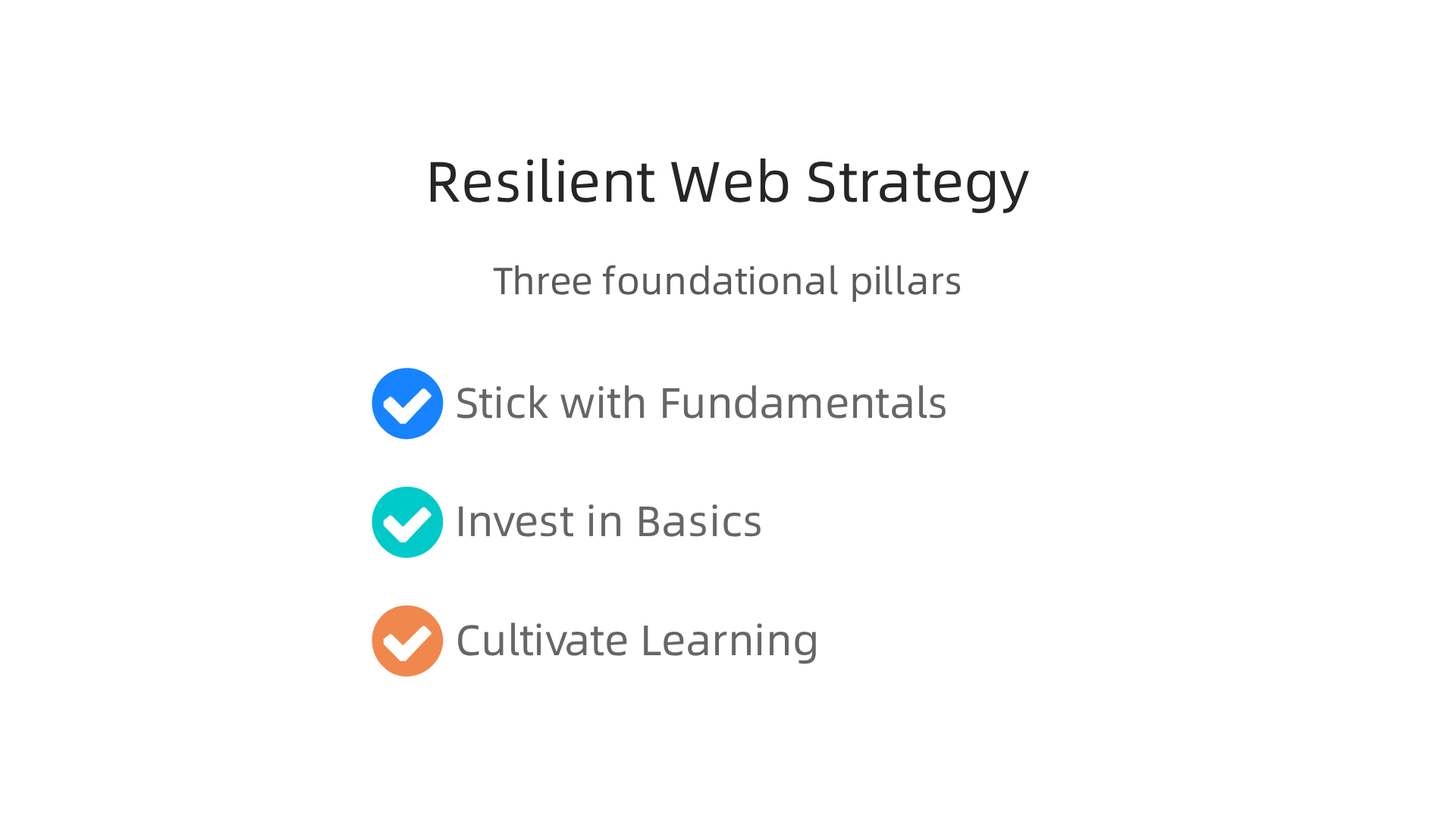
Stick with fundamentals over frameworks
JavaScript frameworks come and go. React, Vue, Svelte, they all evolve. But understanding core web concepts like the DOM, HTTP, and accessibility stays valuable. Teams that invest in strong basics adapt faster when trends shift. According to a recent LogRocket analysis of the 8 trends that will define web development in 2026, meta-frameworks like Next.js and Nuxt are becoming the standard entry point for new projects. These layers sit on top of the same core technologies. If your team knows the fundamentals, learning a new tool is just a matter of time.
Invest in performance, accessibility, and monitoring
Performance and accessibility are not nice-to-haves. They directly affect how usable your site feels. A fast, accessible web app keeps users engaged and reduces bounce rates. Monitoring tools help you catch problems before they frustrate visitors. This long-term investment pays off because it solves the root causes of why the web feels broken. Many teams overlook these basics when they rush to adopt the latest shiny tool. But users care about speed and ease of use more than which framework you chose.
Cultivate a culture of continuous learning

The speed of change means no one can know everything. The best teams create space for learning. Encourage experimentation with new tools but ground it in real project needs. For example, understanding the most important software developer skills for 2026 helps your team prioritize what to learn next. Following reliable resources keeps your team informed without drowning in noise. For staying sharp on AI and tech trends, consider subscribing to The AI Newsletter Worth Reading for daily, clear updates.
A resilient strategy is not about predicting the future. It is about being ready for it. Build on strong fundamentals, invest in what matters to users, and make learning part of your team’s routine. That is how you make the web feel less useless and more like a reliable platform for the long haul.
Practical Steps for Teams
To turn that resilient strategy into daily action, your team can take three concrete steps.
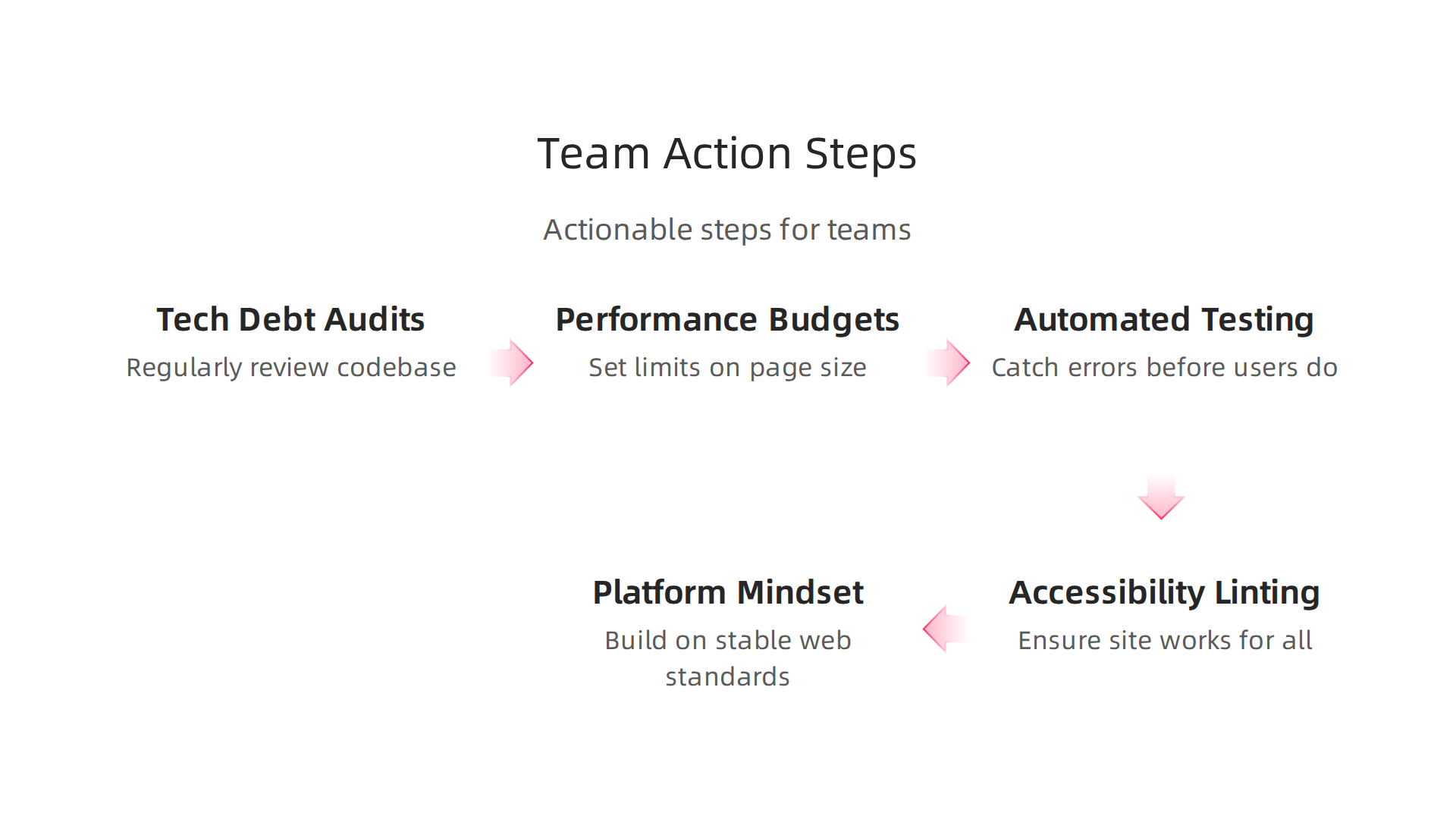
These steps directly fight the feeling that the web feels useless by making your sites faster, more reliable, and easier to maintain.
Conduct regular tech debt audits and set performance budgets.
Tech debt is like interest on a loan. It builds up and slows everything down. A performance budget sets a limit on things like page size or load time. Every month, review your codebase. Pay down the debt that slows users down. This keeps your site running smooth.
Invest in automated testing and accessibility linting.
Automated tests catch errors before users do. Accessibility linting checks that your site works for people with disabilities. Teams that use these tools spend less time fixing bugs and more time building features. According to recent AI software development statistics, developer productivity jumps when automation is part of the workflow.
Adopt a platform over framework mindset.
Frameworks change every few years. Platforms like cloud infrastructure and web standards last longer. Build your core on a stable platform and swap frameworks as needed. This saves you from rewriting everything when the next hot tool arrives. For a deeper look, explore how engineering technology trends 2026 are shifting toward platform thinking.
Finally, keep learning. Subscribe to The AI Newsletter Worth Reading to get daily insights on AI and development trends. A small investment in learning goes a long way.
These steps help your team avoid the pitfalls that make the web useless and build products users love.
Summary
This article examines why many developers and users say


