

In 2026, many people in software engineering feel like they are swimming in new information. Every day, it seems there’s a new AI tool or a fresh way to do things. This fast change can be a lot to handle for engineering leaders and the people who build software.

Actually, how we apply AI in software development is changing everything. Experts say that by the end of 2026, AI will write almost all the code everywhere. This means the world of software engineering as we know it is shifting very fast. You can hear more about this big change in "AI Is About to Change Coding Forever in 2026" on YouTube.
Some people might worry about AI replacing jobs, but it’s more about how our jobs are changing. Now, understanding how to apply AI and even build it is becoming very important. If you want to stay ahead, you need to understand how AI has changed the systems you are asked to design, according to The AI Engineer Interview Playbook for 2026.
This big shift means you need clear, helpful advice. How can you truly apply AI to your software development projects? How can teams use these new tools smartly and make sure they work well? It’s not just about writing code anymore. It’s about how to use tools, even things like no-code app builders, to create great products.
This guide will give you real, proven ways to use AI smartly. We will show you how to apply AI in your daily work, measure its success, and lead your team into this new era. To keep up with all the big changes in AI and tech, make sure you check out The AI Newsletter Worth Reading.
In 2026, the world of software development keeps moving at top speed. To truly understand how to apply AI and other new tools, we need to look at the big picture. Here are the main trends shaping how software is built this year:
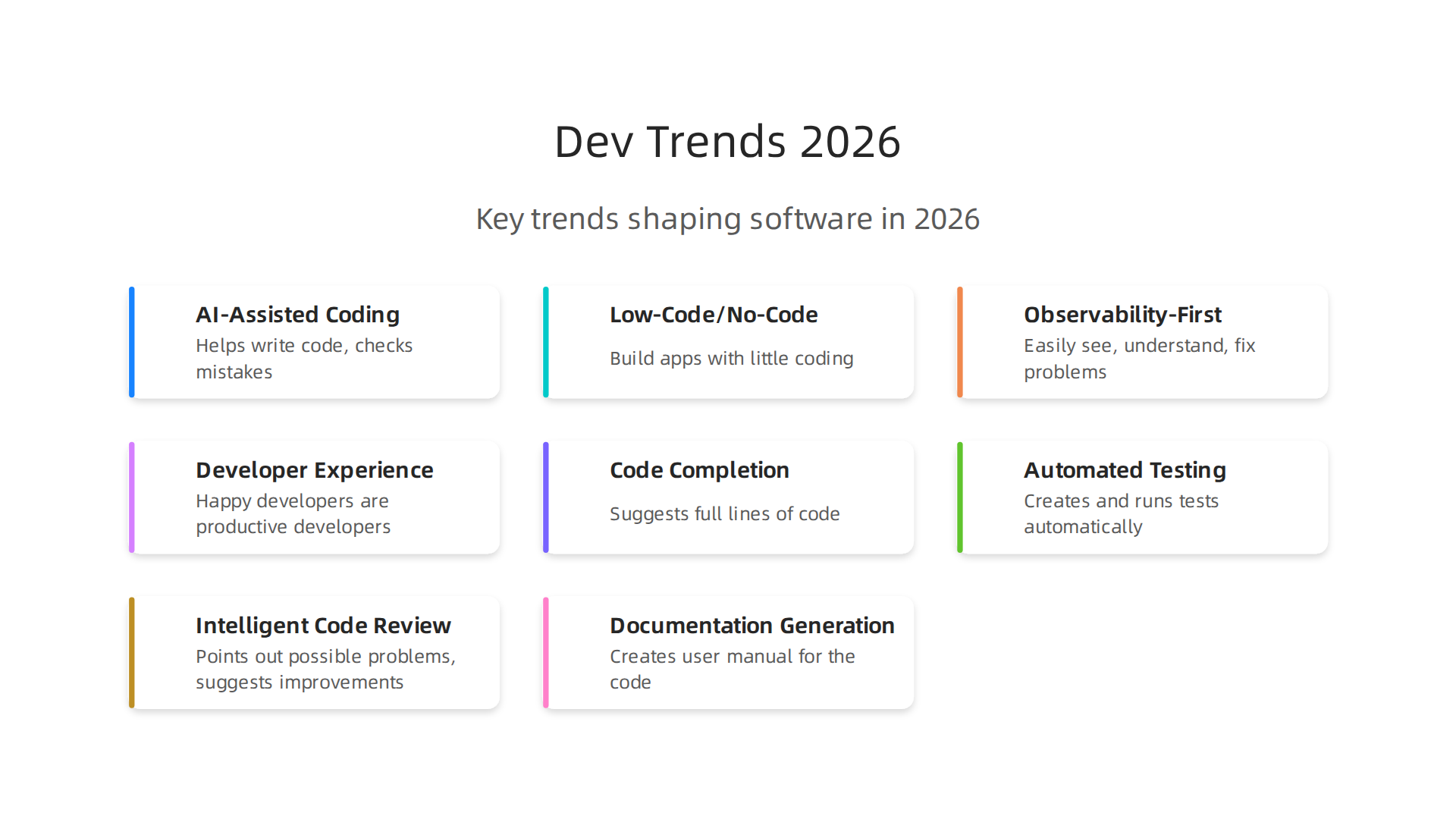
Top Modern Development Trends Shaping 2026
-
AI-Assisted Coding is Everywhere
Think of AI as your smart assistant for coding. It helps write code, checks for mistakes, and even suggests new ways to build things. This year, almost everyone is using AI tools in their work. For example, a big survey from JetBrains in January 2026 showed that 90% of developers regularly use at least one AI tool on the job. Another study found that around 42% of code today is made or helped by AI. This means that to keep up, you must learn to apply AI effectively. It’s not aboutai replacing jobs, but about changing how we work and making us more powerful. For more details on these shifts, check out the Engineering Technology Trends 2026. -
Low-Code and No-Code Platforms are Growing
These platforms let people build apps and websites with little to no coding. Instead of writing lines of code, you often drag and drop parts or fill in simple forms. This makes it faster to createsoftware development projectsand lets more people get involved. Whileno-code app builderswere already big, the push for low-code means even complex tasks can be sped up. It’s a game-changer for businesses wanting to move quickly. Learning about these tools is key, as highlighted in this guide on How Building Without Code Is Transforming Software Development In 2026. -
Observability-First Infrastructure
Imagine knowing exactly what’s happening with your software at all times. That’s what observability is about. It means setting up your systems so you can easily see, understand, and fix problems as soon as they pop up. This is super important because software is becoming more complex, especially with AI and cloud services. Being "observability-first" means thinking about how you’ll watch your systems even before you build them. It helps teams quickly spot issues and keep everything running smoothly. Tools that elevate AI-powered Cloud Security in 2026 are a good example of this trend. -
Emphasis on Developer Experience (DevEx)
Happy developers are productive developers. DevEx means making sure that developers have all the best tools, processes, and support they need to do their jobs well and without frustration. This includes things like easy-to-use coding tools, clear guides, and a smooth setup process. When developers have a good experience, they can focus more on creating great products. This focus on developer happiness helps attract and keep talented people, which is crucial for anysoftware engineeringteam today. You can learn more about making this a priority with a Practical Roadmap For Engineering Teams in 2026.
These trends aren’t separate. They work together. AI helps developers on low-code platforms, and better observability makes the developer experience smoother. For engineering leaders, understanding these shifts is vital for making smart choices about team strategy and what skills to look for when hiring. It’s all about adapting to build better software faster in 2026.
How Teams Can Apply AI: Real Use Cases for 2026
We’ve talked about how AI is everywhere in software development this year. Now, let’s look at how teams actually apply AI in their daily work. It’s not just a fancy tool; it’s a practical helper for many parts of building software.
Here are some real ways development teams are using AI in 2026:
-
Code Completion
Imagine your computer guessing what code you want to write next. That’s code completion with AI. Tools powered by AI can suggest full lines of code, functions, or even entire blocks, making coding much faster. Studies show that AI assistants can significantly increase how much code developers write, especially with advanced tools that do more than just autocomplete, like interactive agents. These tools can increase coding activity by 40% to 180% depending on how advanced they are, as noted in research on Productivity Effects Across Generations of AI Coding Tools. This helps developers get more done without typing every single character. -
Automated Testing
Finding bugs in software can take a lot of time. AI helps here by creating tests and even running them automatically. It can spot issues faster than humans often can, especially in big, complex software development projects. This means fewer bugs make it into the final product and teams can be more confident in their code. -
Intelligent Code Review
When developers finish writing code, others usually check it for mistakes or ways to make it better. AI can act as a smart second pair of eyes. It can point out possible problems, suggest ways to make the code clearer, or help fix security weak spots. This speeds up the review process and helps everyone write better code. AI can lead to important improvements in productivity, reducing the time it takes to review code, with some studies showing a 31.8% reduction in review cycle time overall, as shared in "Measuring AI’s True Impact on Developer Productivity" in 2026. -
Documentation Generation
Explaining how code works is super important, but it’s often a task developers don’t love. AI can help create documentation, which is like a user manual for the code. It can read the code and write clear notes about what it does, saving a lot of time and making sure others can understand and use the code later. -
Dev-Experience Automation
AI also helps automate other tasks that make a developer’s job easier. This could be setting up new projects, managing different versions of code, or making sure everyone’s tools work together smoothly. By taking care of these routine tasks, AI lets developers focus on the more interesting and creative parts of software engineering.
When to Use AI and When Human Smartness Still Leads
While AI is a powerful friend, it’s important to know when to let it take the lead and when human smarts are still best.
-
AI shines in:
- Repetitive tasks: Anything that needs to be done over and over, like checking for simple errors or formatting code.
- Speeding up existing work: AI can help you write code or run tests much faster.
- Finding patterns: AI is great at looking through huge amounts of data to find things humans might miss.
-
Humans are essential for:
- Creativity and new ideas: AI can’t invent a new type of software or come up with a truly unique solution.
- Complex problem-solving: When problems are tricky and need deep thinking, human judgment is key.

*   **Understanding people:** AI doesn't understand users' feelings or how a feature will truly impact someone.
*   **Setting goals:** Humans decide what software to build and why.
It’s clear that AI boosts how much developers can do, and many studies point to a positive increase in productivity with AI help. For instance, a meta-analysis found a moderate but significant increase in productivity associated with using generative AI tools, according to A meta-analysis of the effect of generative AI on developer productivity. But this doesn’t mean ai replacing jobs for good developers. Instead, it changes the kind of work we do, allowing us to build more and bigger things. The key is learning how to work with AI, not against it.
As you look for ways to enhance your skills and stay ahead in the tech world, understanding these real-world applications of AI is a must. If you want to keep up with the latest in AI and tech, make sure to:
The AI Newsletter Worth Reading
Selecting Tools & Integrating AI into Developer Workflows
Now that we know how AI helps, the next step is to choose the right AI tools and bring them into your daily work. This isn’t just about picking the flashiest new thing. It’s about making smart choices that truly help your team and your strategic choices for developer tools and cloud platforms in 2026.
How to Choose the Right AI Tools
When looking at AI tools for your team, think about these important points:
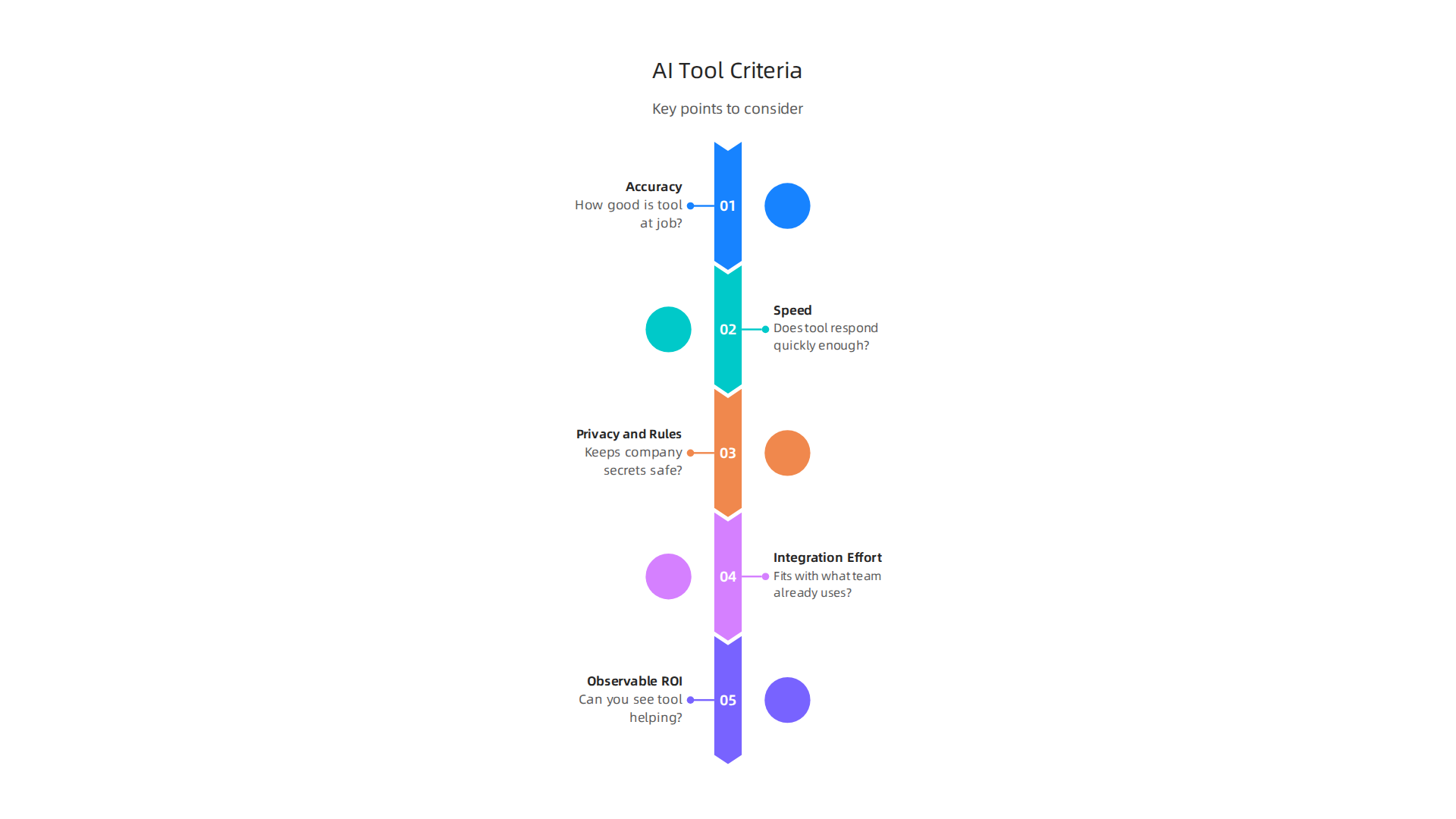
- Accuracy: How good is the tool at its main job? For example, if it’s for writing code, how often are its suggestions actually correct? A tool that makes too many mistakes can slow you down more than it helps. Some studies show that while AI can improve what you get done, there might be a "reliability tax" if the code it makes needs a lot of fixing, as noted in research on AI-Assisted Coding, Bug Risk, and Safe Efficiency Gains.
- Speed (Latency): Does the AI tool respond quickly enough? If you have to wait a long time for an AI suggestion, it can break your focus and make coding feel clunky. Fast tools keep your workflow smooth.
- Privacy and Rules: When you feed your code or project details into an AI tool, where does that information go? Make sure the tool follows all the rules about data privacy and keeps your company’s secrets safe. Checking security rules for AI-generated code is a key way to pick top AI developer tools in 2026.
- How Easy It Is to Set Up (Integration Effort): Some AI tools plug right into your existing programs with little fuss. Others might need a lot of work to get them going. Pick tools that fit well with what your team already uses. A survey in 2026 found that how well a tool fit into a developer’s existing work methods was more important than how good it was on paper, highlighting the importance of easy integration. This was shared in the AI Coding Tool Adoption 2026: Developer Survey Results.
- What You Get Back (Observable ROI): Can you actually see how the AI tool is helping? This might be faster work, fewer bugs, or happier developers. Before you fully commit, try to find ways to measure if the tool is truly making things better. If you want to avoid common issues, understanding this return on investment is vital for success and helps you learn why AI projects fail.
Smart Ways to Bring AI into Your Team’s Work
Bringing AI into your team doesn’t have to be a big, scary change. You can do it step-by-step:
- Start with Small Projects (Pilot Projects): Don’t try to change everything at once. Pick a small, less critical project to test out a new AI tool. This helps your team learn how to use it, see its real benefits, and work out any problems without much risk.
- Use AI Services Directly (API-First Adoption): Many AI tools offer "APIs." This is like a special doorway that lets your existing software talk directly to the AI tool. This way, you can add AI powers to your programs without needing to build the AI from scratch. This approach is often recommended when you want to evaluate and integrate generative AI platforms.
- Add AI to Your Automated Workflow (CI/CD Pipeline Integration): This is a powerful way to apply AI. Your CI/CD pipeline is where code is automatically built, tested, and prepared for release. AI can be added here to:
- Check code automatically: Spot problems before humans even see them.
- Generate tests: Create new tests for your code on its own.
- Improve deployments: Make sure new software versions go out smoothly and safely.
Many modern teams are integrating AI into their CI/CD pipelines, using ways like Model Context Protocol (MCP) to connect AI coding agents to this workflow. This is seen as a main way to integrate AI in 2026, according to research on Agentic CI/CD: AI-Driven Delivery Pipelines and the Rise of CA/CD. It’s about letting AI help manage the steps of your software delivery, ensuring quality and speeding things up. Keeping AI suggestions reviewable is a good way to work with these pipelines.
By thinking carefully about which tools you choose and how you slowly bring them into your work, your team can truly apply AI to boost what they do. This ensures that AI helps, not hurts, the overall developer experience 2026.
After you carefully choose AI tools and start using them in your team’s work, the next big step is to know if they are actually helping. You need to see if the tools you use to apply AI are making things better, not just different. This means looking at real numbers and trying out new ideas in a smart way.
Metrics & Experiments: Measuring the Impact of AI on Productivity
It’s not enough to simply use AI; you have to measure its true effect on your team’s work. This helps you understand if you’re really boosting productivity or if there are unexpected downsides, like more bugs or slower code reviews.
Important Ways to Measure AI’s Help
To see if AI is truly helping, look at these key numbers, also known as metrics:
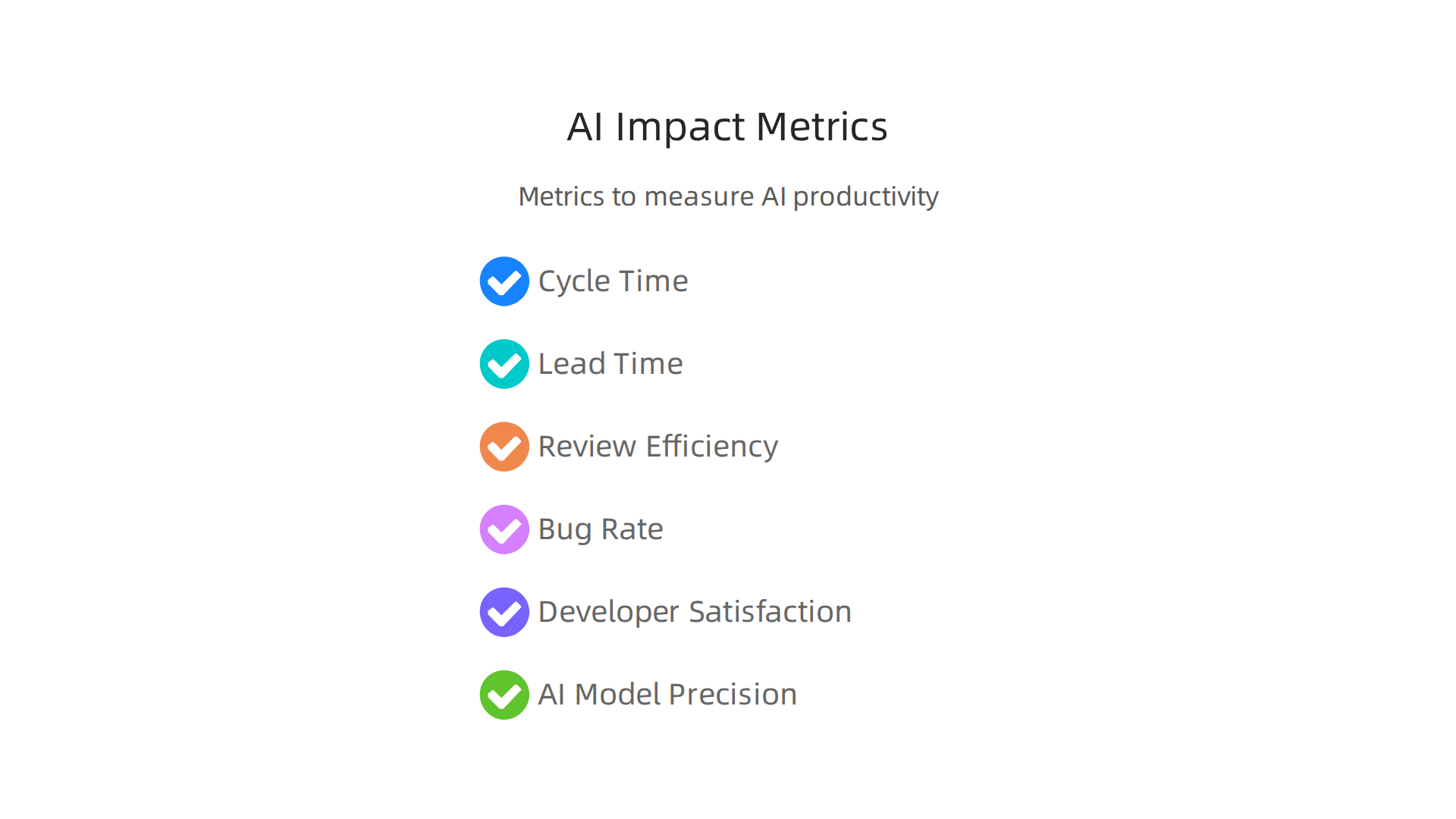
- Cycle Time: This is how long it takes for a new idea to become working software. If AI helps you build faster, this number should go down.
- Lead Time: This is similar to cycle time but often includes even earlier steps, like how long it takes from getting an idea to deploying it. AI might shorten this by helping with design or planning.
- Review Efficiency: How quickly do teammates review each other’s code? AI tools can sometimes make code easier to understand or fix simple mistakes, speeding up reviews. However, if AI-generated code is unclear or introduces new problems, review times can actually go up. The 2026 Engineering Report shows that AI can sometimes lead to an increase in code churn and review time if not managed well, highlighting the need for careful tracking of these metrics as part of your AI Impact on Engineering Productivity: 2026 Report Data analysis.
- Bug Rate: Are there more or fewer bugs in the software after using AI? Good AI tools should help reduce bugs. Bad ones might create more.
- Developer Satisfaction: Are your developers happier and less stressed? AI should ideally take away boring tasks, letting engineers focus on more interesting software development projects.
- AI Model Precision and Recall: If you’re building your own AI tools or fine-tuning them, these numbers tell you how accurate the AI is. Precision means how many of the AI’s suggestions are correct, and recall means how many of the needed suggestions the AI actually gave. These are important if you’re deep into software engineering vs software development specific tasks.
Many engineering leaders in 2026 are still figuring out the best ways to measure the return on investment for AI, with many not formally measuring its impact, even while reporting productivity gains, according to a survey on Engineering leaders are investing in AI. How are they measuring ROI?. This makes setting clear metrics even more important for your team.
Testing AI Smartly with Experiments
To really know if an AI tool works for your team, you can use a simple testing plan:
- Start with an Idea (Hypothesis): First, guess what you think the AI tool will do. For example, "Using AI for code suggestions will reduce bug rate by 10% for our next small project."
- Run Small Tests (Controlled Pilots): Don’t roll out a new AI tool to everyone at once. Pick a small team or a low-risk software development project to test it out. This way, if something goes wrong, it won’t affect everything. This is much like how you might test a new feature in a no-code app builders environment before widespread use.
- Watch Closely (Observability): While the small test is running, keep a close eye on the metrics you decided on. Are the cycle times actually getting shorter? Is developer happiness going up? This step helps you see the real effects of the AI. Some organizations are using tools that provide 20 metrics across the software development lifecycle, including new AI metrics, to help with this in 2026, as noted in the 2026 Software Engineering Benchmarks Report.
- Have a Backup Plan (Rollback Criteria): What if the AI tool doesn’t work as expected, or even causes problems? You need a clear plan to stop using it and go back to how things were before. This reduces risk and makes your team feel safer trying new things.
By using these methods, you can make sure that when you [apply AI], it truly helps your team work better and smarter. It’s all about making informed choices to balance the gains of AI with responsible AI practices for software teams.
If you want to stay updated on how AI is changing the tech world every day, make sure to get the latest insights.
The AI Newsletter Worth Reading
When you start to use AI, it’s not just about the tools; it’s also about how your team and company change. To truly [apply AI] well, you need clear rules, new skills for your team, and a good plan for everyone to start using these new technologies. This is called organizational change.
Making Sure AI is Used Safely and Fairly
Putting AI into your work means thinking about important safety rules. These rules are known as governance and risk management. You need to make sure that:
- Data is Private: Any information AI uses must be kept safe and private. This stops sensitive company or customer data from getting out.
- Ideas are Protected: If AI helps create new code or ideas, you need to know who owns them. This is about intellectual property.
- Systems are Secure: AI tools need strong security so they can’t be hacked or misused. This includes careful security reviews.
- AI is Fair: AI can sometimes learn bad habits or biases from the data it’s trained on. You need ways to check and fix this so the AI treats everyone fairly.
Many companies in 2026 are still getting the hang of these rules. A report found that only 45% of organizations have clear rules for how to use AI, meaning most operate without a central guide. This lack of direction can make companies unsure if they could pass an audit on their AI use, with 78% of business leaders feeling unprepared. Creating clear guidelines helps prevent problems like security risks and ensures that AI is used in a good way. If not managed properly, AI projects can fail. To learn more about common issues, consider reading about why AI projects fail.
Helping Your Team Learn New AI Skills
As AI becomes more common, the way people work changes. This means your team needs new skills, which is called upskilling.

It’s not always about [AI replacing jobs]; often, it’s about changing jobs.
- New Job Roles: Some old tasks might be done by AI, but new tasks will pop up that need human smarts. For example, people might need to become "prompt engineers" who know how to ask AI the right questions, or "AI ethicists" who ensure AI is fair.
- Training Plans: Your company should have plans to teach your engineers about AI. This could include courses on how to use AI coding tools or how to understand AI’s suggestions. There are many great best AI certification courses in 2026 available to boost careers.
- Hiring Smart: When looking for new team members, you’ll want to find people who already understand AI or are excited to learn. These "AI-savvy" engineers can help your team grow. However, finding these skilled workers can be a challenge, with many companies facing talent and skill shortages when trying to integrate augmented engineering practices, according to a 2026 report.
By planning for these changes, you can help your team feel ready and excited to [apply AI] in their daily work. This also means understanding the important software developer skills 2026 that are needed in today’s fast-changing tech world.
The world of technology keeps moving fast, and AI is changing things quicker than ever. Looking ahead to the next 3 to 5 years, it’s smart for companies to think about different ways AI might grow and how they can get ready.

This is called scenario planning.
Getting Ready for Different AI Futures
There are two main ways AI could change how we work: it could speed up super fast, or it could be brought in more carefully. Both ways need a good plan.
Fast AI Acceleration
Imagine a world where AI quickly takes over many common tasks. This means a lot of software code might be written by AI, not just humans. Studies in 2026 already show that about 42% of code is made or helped by AI, and this number is expected to grow a lot by 2027. Some experts even think AI will write almost all code everywhere soon, marking a huge shift in software engineering.
In this fast-paced future, your company needs to:
- Be Super Flexible: Get ready to use AI tools for many tasks right away. This means constantly trying new AI software.
- Focus on AI-Driven Solutions: Think about how AI can do big parts of your [software development projects] from start to finish. This might mean fewer worries about [AI replacing jobs] for simple tasks, but more focus on managing AI.
- Measure AI’s Impact: Even with fast changes, it’s vital to know if AI is really helping. A 2026 report found that many engineering groups are not properly checking how much AI helps their work, even though leaders report gains in productivity. It’s important to track things like code quality and team health, as shown in the 2026 Software Engineering Benchmarks Report.
Measured AI Integration
This approach means bringing AI into your work step by step, making sure everything is done well and safely. It’s about slowly adding AI to make things better, rather than changing everything at once.
In this scenario, your company should:
- Focus on Upskilling: Keep teaching your team new skills, like how to guide AI or understand its outputs. This ensures humans and AI work together smoothly.
- Strengthen Governance: Make sure you have clear rules for how AI uses data and how secure it is. This helps prevent problems and makes sure AI is fair for everyone.
- Thoughtful Tool Choices: Pick AI tools carefully, focusing on those that fit your team’s needs and bring real value. Thinking about strategic choices for developer tools and cloud platforms in 2026 can help.
Your AI Roadmap: A Checklist
No matter which path AI takes, here’s a simple checklist to help your team prepare and continue to [apply AI] smartly in 2026 and beyond:
- Run Small Experiments Now: Don’t wait! Start trying out AI tools on small [software development projects]. Many developers are already doing this; studies from 2026 show that 90% of developers use at least one AI tool regularly at work, and 95% use AI tools weekly. This widespread use is detailed in a JetBrains AI Tools Survey 2026.
- Prioritize New Skills: Beyond just coding, focus on skills like being good at "prompt engineering" (asking AI the right questions) and understanding "context engineering" to build strong AI systems. Also, learn about new tools like no-code app builders, which can change how you create applications.
- Design Long-Term Governance: Plan out your rules for AI now. Think about how to keep data private, secure your systems, and make sure your AI acts fairly over time. This ongoing effort will help you balance AI productivity with responsible AI practices for software teams.
By thinking about these different futures and taking steps today, your team can be ready for whatever AI brings. Staying informed is a big part of this readiness.
To get clear daily AI updates and understand these big technology changes, consider subscribing to The AI Newsletter Worth Reading.
Summary
This article explains how AI is transforming software engineering in 2026 and gives practical guidance for teams and leaders who need to apply AI effectively. It reviews the major trends—widespread AI-assisted coding, growth of low/no-code platforms, observability-first infrastructure, and a renewed focus on developer experience—and shows concrete use cases like code completion, automated testing, intelligent code review, and documentation generation. The guide explains how to select and integrate AI tools (API-first adoption, CI/CD integration, and pilot projects), how to measure real impact with metrics and controlled experiments, and how to prepare organizations with governance, security, and upskilling plans. Readers will learn how to run safe pilots, pick tools that fit their workflow, track ROI with clear metrics, and create a practical roadmap to adopt AI without sacrificing quality or compliance.


